ZoomInfo vs Apollo comes down to the operating model you want. Choose Apollo when your sellers need contact research, sequences and calling in one self-serve workspace. Choose ZoomInfo when your revenue team needs deeper account intelligence, configurable buyer signals and a negotiated enterprise data package. Neither vendor clearly wins on contact accuracy without a test against your own accounts.
The pricing distinction is material. Apollo publishes per-seat tiers, while ZoomInfo's Sales packages are scoped by licenses, credits and features. ZoomInfo also has a separate, free-to-start GTM AI access path. Don't mistake that API offer for a free enterprise Sales subscription.
 Choose Apollo for an outbound execution workspace
- Public per-seat pricing and a free entry option
- Prospecting data connects to sequences, calls and CRM activity
- Good first evaluation for teams that want to start without a negotiated platform contract
 Choose ZoomInfo for intelligence-led account coverage
- Contact and company discovery with buyer-intent capabilities
- Advanced account prioritization, hierarchy data and workflow options
- Better evaluation fit when RevOps can manage contracts, data credits and integrations
ZoomInfo vs Apollo at a glance
ZoomInfo and Apollo both combine contact data with sales workflows, but their package boundaries differ. The table describes vendor-advertised capabilities, not independently measured accuracy or a guarantee that every feature is included in a quote.
| Tool | Buying model | Outreach workflow | Buyer intent | Data consumption | Best initial test |
|---|---|---|---|---|---|
| Apollo | Published self-serve per-seat tiers | Sequences, calling and tasks in the same workspace | Intent topics vary by plan | Pooled credits, with unused credits expiring at cycle end | Rep workflow from contact to booked meeting |
| ZoomInfo | Sales packages quoted by licenses, features and credits | Sales engagement and dialer functions, described as a paid add-on; verify quoted scope | Streaming Intent is offered as an add-on to base plans | Credits used for enrichment and exports; separate GTM AI credit model exists | Account coverage, intent-to-CRM routing and contract fit |
- Small SDR team that wants prospecting, sequences and calls in one self-serve workspaceApollo
- Buyer who wants published per-seat pricing and a free pilotApollo
- Enterprise team that wants configurable buyer signals and a negotiated data packageZoomInfo
- RevOps team that can manage contracts, credits and integrationsZoomInfo
- Developer or agent workflow that needs API-based enrichment with free-to-start creditsZoomInfo
| Decision | Apollo | ZoomInfo |
|---|---|---|
| Public paid price | Basic $49, Professional $79 and Organization $119 per user monthly on annual billing, as listed in Apollo's published comparison | No fixed dollar amount shown for the Sales packages on its pricing page |
| Free entry | Free plan listed at $0 with limited credits | Free-to-start GTM AI account is separate from Sales package pricing |
| Procurement question | How many users and credits do we need? | Which licenses, credits, signals and add-ons are in the written quote? |
| Main risk | Reps exhaust the credit pool before the billing reset | A demo includes features that aren't in the contracted package |
Pricing checked October 29, 2026. Apollo's pricing FAQ currently refers to a Custom option for enterprise needs, while its own published comparison still lists Organization. Confirm the plan name, limits and checkout amount before you sign. ZoomInfo's pricing page offers custom packages and asks buyers to request pricing through its sales process. Avoid treating third-party estimates as vendor quotes.
Which is better for your sales team?
For a founder or a small SDR team, Apollo is the more straightforward pilot. A rep can find a prospect, add the contact to a sequence, make a call and record the activity in a connected workflow. You can see the published entry pricing before meeting sales. Of course that doesn't mean the cheapest tier covers your required data and calling volume.
For a territory-based enterprise team, ZoomInfo deserves a serious trial. ZoomInfo describes higher package levels with advanced integrations, direct API access, dedicated support and custom datasets, and sells Streaming Intent, Sales Engagement and full website visitor identification as paid options. Ask which of those components are included in the exact package offered to you.
Don't choose by company size alone. It's a weak signal. A large team running simple outbound may value Apollo's workflow and predictable seat math. A smaller company with complex buying committees might benefit from ZoomInfo's signals, if the data and quoted terms justify the spend.
ZoomInfo vs Apollo pricing: what will you pay?
Apollo pricing and the real credit question
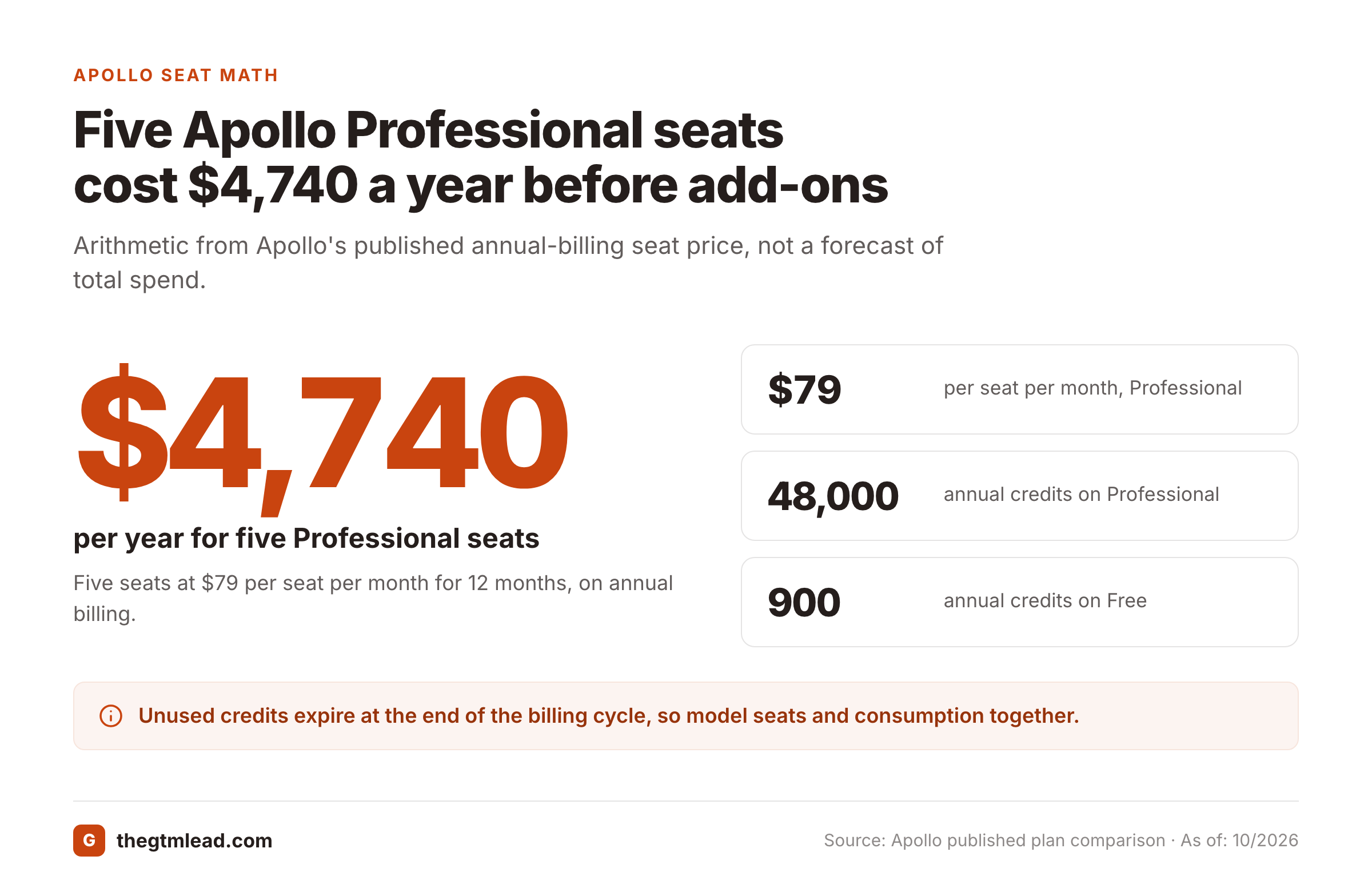
Apollo's published comparison lists Free at $0, Basic at $49, Professional at $79 and Organization at $119 per user per month on annual billing. Its comparison also lists annual credit allocations of 900 for Free, 30,000 for Basic, 48,000 for Professional and 72,000 for Organization. These are vendor-published figures, not an independently verified checkout offer.
Apollo's current pricing FAQ explains that credits are pooled across a team and granted at the start of a billing cycle. It also says unused credits don't carry over past the cycle boundary. Purchased add-on credits don't roll over either, and add-on purchases can renew automatically until removed. You'll need to model both headcount and consumption. Reps who run out mid-cycle have to wait for the reset or buy add-on credits.
The plan labels deserve attention. Apollo's live FAQ calls out Free, Basic, Professional and Custom, while another Apollo-owned comparison names Organization. Don't assume the older Organization label or its listed limits will appear unchanged in your account. Ask Apollo to confirm the offer in writing, especially for a multi-user deployment.
A budget example makes the seat math tangible. Five Professional seats at $79 per seat per month for 12 months total $4,740 annually, before additional credits or other paid options. This is arithmetic from Apollo's published annual-billing price, not a forecast of total spend. If your reps need more contact reveals or calling capacity, the real cost changes.
ZoomInfo pricing and contract scope
ZoomInfo doesn't show a fixed dollar price for its paid Sales packages. Its pricing page says it offers custom packages based on your B2B data use cases and needs, and its own guidance says cost depends on the features and credits in the package. Streaming Intent is offered as an add-on to base plans.
ZoomInfo's own description of its levels is more useful than a third-party starting-price estimate. Higher levels add enterprise-grade connectors, direct API access and dedicated support, while Streaming Intent, Sales Engagement and full website visitor identification are described as paid options on top of base plans. Package names and contents change, so treat any feature list as a starting point for scoping, not proof that your quote contains every capability shown in a demo.
ZoomInfo says data credits are used for enrichment and exports, and that consumption varies with the depth of data. It also says paid plans are billed annually rather than monthly. Don't assume every deal has the same minimum term or per-contact economics. Get the signed order form and credit definitions.
Does ZoomInfo have a free plan?
There's a separate route for developers. ZoomInfo's GTM AI page advertises 1,000 data credits and 1,000 AI credits free at signup, with API, MCP and CLI access. It describes pay-as-you-go top-ups after the free allotment. This isn't the same commercial product as a quoted ZoomInfo Sales deployment.
The GTM AI documentation also explains that search, lookup and find-similar calls are free while enriching a record consumes one data credit per new record. Teams evaluating agent-based prospect research should compare that path separately. Don't use that signup allowance as evidence of the price of a quoted ZoomInfo Sales package.
Contact database and accuracy: which has better data?
Neither provider's published database count proves a higher match rate for your ideal customer profile. Apollo describes access to 240M contacts and 30M companies on its current site. ZoomInfo's October 2026 corporate release describes more than 500M contacts and 100M companies. Those are vendor-stated inventory figures, not equivalent measures of reachable buyers.
A record can exist without the right current title, deliverable email or working direct number. That's the gap a headline count hides. A larger collection may contain more contacts outside your market. A smaller collection may cover your exact buyer personas well. That's why a sample test beats a headline count.
Use a blind list assembled by your own RevOps team. Include accounts that haven't been suggested by either vendor, difficult job titles and geographic segments where you sell. Keep the sample fixed between tools. Don't allow the vendor to quietly substitute better-covered accounts.
| Metric | How to measure it | Decision it informs |
|---|---|---|
| Account coverage | Share of target companies with a relevant contact | Can reps build their actual territory? |
| Persona fit | Correct job function and seniority against a checked source | Is the contact useful? |
| Email validity | Accepted delivery after suppression and verification | Will sequences reach inboxes? |
| Direct-phone accuracy | Calls that reach the intended person, not a switchboard | Is a phone-first motion viable? |
| Freshness | Changed roles or departed employees in the sample | How much cleanup will RevOps own? |
| CRM duplicate rate | Existing records duplicated or overwritten | What will the integration break? |
Don't treat email deliverability as a proxy for response rate. Don't count a company switchboard as a verified mobile. The winner is simply the vendor that produces more usable contacts at an acceptable cost under your test conditions.
Sales engagement: sequences, dialers and CRM handoffs
Apollo explicitly positions its sales engagement product around multi-channel sequences, calls, tasks, scheduling and CRM sync. Its sales engagement page describes sequence steps across email, calls and networking platforms. It also describes call recording and automatic CRM logging. That makes it a logical pilot for a team that wants prospecting and execution close together.
A typical Apollo workflow starts with a persona filter. The SDR saves a contact, checks the available fields and adds that person to an approved sequence. The rep handles replies and calls in the same environment, while RevOps checks whether activities and ownership sync to the CRM. Don't assume the sequence itself has approved product claims or compliant regional consent rules. Those are team controls, and they're not the vendor's job.
ZoomInfo describes automated outreach sequences and dialer functions as Sales Engagement, a paid add-on. Its October release also presents GTM Studio as a platform connecting intelligence with sales engagement and workflow orchestration. ZoomInfo therefore isn't merely a static contact directory.
A practical ZoomInfo workflow begins with an account or signal filter, then contact selection and CRM routing. A seller follows an approved outreach path. RevOps checks whether the selected entitlement includes the needed workflow, automation and integration. Ask to see a successful round-trip update in your CRM, not just a screenshot of the product's activity feed.
The difference isn't really whether either product can send an email. It's where you want your sellers to work and who'll maintain the handoffs. If you're already committed to a separate sales engagement platform, evaluate whether either vendor duplicates it or complements it.
Intent data and account prioritization
Apollo's vendor comparison assigns intent topics by plan. That gives an outbound team a way to filter prospects by a limited set of interests, but it doesn't guarantee that the signal is timely, exclusive or predictive of a purchase. Ask what generated each signal, how old it is and which accounts it covers.
ZoomInfo describes Streaming Intent as an add-on to base plans and full website visitor identification as a paid option. The distinction matters: a salesperson shouldn't assume a feature shown in a product tour is in the base contract.
For either vendor, build a simple operating rule: a signal can trigger research, not an unreviewed sales claim. Product marketing should own approved messaging and caveats. Sales leadership should own the follow-up SLA. RevOps should own CRM fields, signal expiration and suppression logic.
Define an intent-to-action threshold
Write the signal types, age limits and account fit rules that qualify an account for review. Reject signals with no clear owner or expiration.
Choose the contact and verify the role
Find the current buyer persona, confirm the company relationship and check whether an existing CRM record should be updated instead of duplicated.
Attach an approved message
Link the release brief, allowed claims and prohibited wording to the outreach task. Don't let the signal become permission to invent a pitch.
Measure downstream results
Track usable contact rate, replies, meetings and pipeline from the same cohort. Separate signal quality from seller execution.
Integrations, API access and governance
Apollo's sales engagement page names Salesforce and HubSpot as CRM sync targets. Its pricing FAQ says all seats in an Apollo account use the same plan level. This matters when a team wants inexpensive research-only seats alongside advanced calling seats. Check the account-wide tier before estimating the bill.
ZoomInfo says enterprise-grade connectors and direct API access come with higher package levels. The vendor's GTM AI product separately provides API and MCP access with its own credits. Don't assume the same endpoints, rate limits or usage entitlements apply across a traditional Sales subscription and the developer offer.
Both vendors require an operational design, not just an API key. It's the part that's easy to skip. Decide who may enrich or overwrite a CRM contact, which fields win when values conflict, how opt-outs are handled and where activity records live. Keep a change log for automated enrichment. Restrict exports to the people who need them. Everyone else doesn't need that access.
For a revenue leader, the critical handoff is often between data and messaging. A newly detected buying signal may be correct, but a rep can still pitch an unapproved feature. Use a release brief with approved positioning, exclusions and an owner. Require a quick readiness acknowledgment before a new launch campaign goes live. Neither contact database should be treated as your source of truth for product claims.
How to run a fair ZoomInfo vs Apollo pilot
You won't learn much from comparing different prospect lists or different outreach messages. Give both products the same job, the same sample and the same definitions of success. Otherwise you'll compare sales pitches instead of products.
- Define target industries, company sizes, geographies and buying roles
- Create a blinded account and contact sample owned by RevOps
- Record the exact plan or quoted SKU used in each test
- Measure contact coverage, role match, email validity and direct-phone correctness separately
- Track credit consumption for emails, phones, exports and enrichment
- Test CRM duplicate handling, field ownership and activity sync
- Verify sequence, dialing, intent and API features in the purchased tier
- Ask for a written credit rollover and overage policy
- Ask for renewal notice dates, price changes and cancellation language
- Run the same approved outreach message and suppression rules
- Compare usable contacts and meetings, not raw records
- Get final commercial terms and support obligations in writing
Make the test hard enough to expose weaknesses
Start with a representative slice of your real territory. Include mature accounts, recent hires, international prospects if relevant and contacts with ambiguous titles. Reserve part of the list as a holdout the vendors haven't seen, so they can't tune for it. That reduces the chance of a polished demo hiding thin coverage.
Have your team verify results independently. When an email bounces, label it as an email issue. When the title is wrong, label it as a role issue. When a call reaches a generic reception desk, don't mark the direct dial as correct. Keep the raw outcomes so procurement can audit the scorecard. They're your evidence.
Calculate cost per usable contact, not cost per credit
Use this decision formula: total committed spend divided by usable contacts delivered in your target segment. Include seats, credit packs, implementation and any engagement tools you'll keep. Then calculate the cost per meeting from the same cohort. A low list price doesn't help if your reps spend their time repairing data.
A pilot with clear definitions is a far stronger procurement artifact than a spreadsheet of claimed database sizes.
The contract questions that change the decision
An attractive demo can hide an expensive handoff. Before you compare prices, ask each vendor to walk through the workflow using your CRM fields, permissions and contact ownership rules. Have the vendor identify which actions spend credits. You'll want that in writing. A contact viewed in a browser, exported to a CSV and enriched through an integration may not have the same commercial treatment. The written answer matters more than a verbal assurance.
Ask for a separate breakdown of platform access, named users, pooled credits, additional credits, premium signals, API rights, support and onboarding. For ZoomInfo, the vendor describes custom packages built around use cases, features and credits. For Apollo, the pricing FAQ describes team-wide credit pools and recurring add-ons. Those differences change how you monitor spend after launch.
Don't assume unused credits have the same treatment across products. Apollo expressly says unused credits expire at the end of the billing cycle. For ZoomInfo, request the applicable rollover and renewal language for your quoted product. The developer-oriented GTM AI offer has its own credit terms. Mixing those documents can create a budget error.
Put renewal dates in the procurement calendar before the contract is signed. Assign a business owner to check whether the data is still delivering usable contacts and whether paid features are being used. If the team hasn't measured those outcomes, the renewal discussion becomes a negotiation about anecdotes instead of value.
What changes for product marketing and sales enablement?
Contact data and intent signals are upstream of the message a seller uses. They don't validate a new feature claim, a competitive statement or a promise about the product roadmap. That gap becomes more visible during a launch, when the newest messaging is also the least familiar to the field, and it's the moment unapproved claims slip in.
Give each campaign an approved source brief. It should say what changed, who benefits, which evidence supports the claim and what sellers must not say. Pair that with a short readiness check before a new sequence is activated. If the team changes the pitch, preserve the previous version and record who approved the replacement. That process belongs to product marketing and enablement. It doesn't belong to either contact database.
Keep the buyer-signal workflow and the release-approval workflow separate. A sales leader can decide that an account deserves attention. Product marketing decides which launch claims are cleared. RevOps decides how those decisions are represented in the CRM. When those owners are explicit, both Apollo and ZoomInfo can serve the same go-to-market process without becoming an accidental source of unapproved messaging.
A scorecard you can use at the decision meeting
| Dimension | Evidence to bring | Owner |
|---|---|---|
| Data fit | Blind sample with contact and role verification | RevOps |
| Outreach execution | Recorded path from prospect to reply or call | Sales operations |
| Buying signals | Signal definitions, recency and observed account relevance | Demand generation |
| CRM integrity | Field mapping, duplicate handling and permission test | CRM administrator |
| Commercial exposure | Signed quote, credit policy, renewal and add-on terms | Procurement |
| Launch readiness | Approved pitch, exclusions and acknowledgment process | Product marketing |
A useful decision meeting doesn't end with a favorite user interface. It ends with an owner for the next test, a documented reason to buy or defer and a record of the risks that remain. If the sample's inconclusive, narrow the pilot to the segment where you expect the most value instead of expanding the commitment.
When should you choose Apollo, ZoomInfo or neither?
- Small team wants to start outbound without a custom sales contractPilot Apollo first; check credit usage and required paid features.
- Enterprise team wants intent, account hierarchy and coordinated workflowsEvaluate ZoomInfo's quoted package against a fixed sample and entitlement list.
- Existing engagement platform is stayingTest both as data sources and price the integration, not a replacement suite.
- AI agent needs occasional B2B enrichment rather than seller seatsEvaluate ZoomInfo GTM AI separately from Sales packages and compare API economics.
- Phone coverage is the decisive factorRun a blinded direct-dial test; neither vendor can win from its marketing claims alone.
- Neither pilot meets role accuracy or consent requirementsDon't buy yet. Fix the target definition, workflow and compliance checks before scaling.
The best choice depends on the bottleneck. Apollo is easier to justify when you want one outbound workspace and published seat pricing. ZoomInfo is worth the procurement effort when the account intelligence and signal workflows deliver measurable gains. If neither passes your data-quality threshold, postponing the purchase isn't a failure. It's a valid decision.
Frequently asked questions
Is Apollo cheaper than ZoomInfo?
Apollo publishes paid per-seat prices, while ZoomInfo's Sales packages require a tailored quote. Apollo may have a lower entry commitment, but compare actual credit use, integrations and contract terms before deciding.
Does ZoomInfo offer a free option?
ZoomInfo GTM AI offers a free-to-start API and MCP account with an initial credit allocation. That's distinct from a quoted ZoomInfo Sales package.
Which has more accurate contact data?
Neither vendor's public database size establishes accuracy for your target accounts. Test the same blinded list for role fit, valid emails and direct phones.
Can Apollo replace a sales engagement tool?
Apollo includes sequences, calling, tasks and CRM syncing. Whether it can replace your current platform depends on your required workflows, governance and plan limits.
Does ZoomInfo include intent data?
ZoomInfo offers Streaming Intent as an add-on to base plans. Confirm the signal types, volumes and entitlements in the written quote.
What should procurement request before signing?
Get the SKU list, seat terms, included credits, overage rates, integration entitlements, support scope, renewal notice period and cancellation terms in writing.