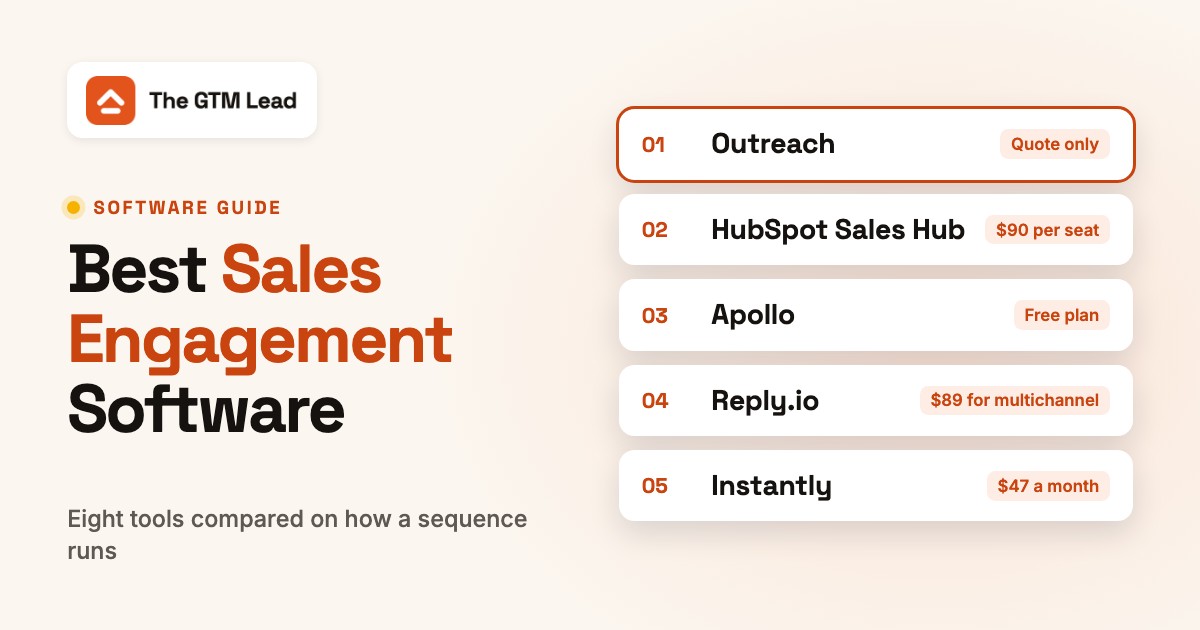
Sales engagement software lets sales reps run outreach as a sequence: a planned run of emails, calls, LinkedIn touches and tasks that starts when a contact is enrolled and stops when they reply or book a meeting. The tool sends the automatic steps, turns the manual ones into tasks, logs activity to the CRM and reports which messages get replies.
This guide compares eight tools in three groups: dedicated platforms (Outreach, Salesloft), engagement built into a CRM (HubSpot Sales Hub, Salesforce Sales Engagement) and outbound bundles for small teams (Apollo, Reply.io, lemlist, Instantly). We judged each one on a job a product marketer or revenue leader has after a positioning or pricing change: get the new message into the sequences reps actually send, compare it with the old one and see who's still sending the old version. That job depends on how a sequence is built, who's allowed to edit a shared template and which plan unlocks A/B tests, so every entry covers those. We read each vendor's pricing page, a product page and a help article on October 28, 2026. Six of the eight list a USD price, and Outreach and Salesloft are quote only. G2 blocked direct access for most tools, so a rating appears only where we read the G2 page.
- tools compared in three groups
- 8
- list a USD price on their own site
- 6 of 8
- sequence emails per day per HubSpot seat on Professional / Enterprise
- 500 / 1,000
- per user per month for the Salesforce Sales Engagement add-on
- $50
Best Sales Engagement Software: Our Picks
Each pick is the tool we'd look at first in one situation, judged on how a sequence is built, which plan unlocks it and how much of that you can verify before a demo.
 Best for HubSpot teams on ProfessionalHubSpot Sales HubSequences, A/B tests of up to six versions per email and reply and meeting rates per step, from $90 per seat.
 Best for teams that live in Salesforce recordsSalesforce Sales EngagementCadences and a Work Queue inside Sales Cloud; a $50 per user add-on, or included in top editions.
 Best for admin control over templates and sequencesOutreachSequences are private, visible or usable by others, template rights are set per profile and email steps take two-template tests. Quote only.
 Best if you also want Clari's deal and forecast productsSalesloftCadences with template variants, now one company with Clari. Quote only, and its help center didn't load for us.
 Best for contacts and sequences in one tool, with a free planApolloSequences from the free plan, A/Z tests from $79 per seat, database paid by credits.
 Best for branching multichannel sequencesReply.ioYes/no conditions on opens, replies and LinkedIn connections; $49 per user for email only, $89 for multichannel.
 Best for LinkedIn and call steps with named task ownerslemlistManual tasks carry an assignee and instructions; step tests split 50/50; Multichannel is $87 per user.
 Best for high-volume cold email on a flat planInstantlyUnlimited sending accounts and up to 26 variants per step, from $47 a month and not priced per seat.
Sales Engagement Software Compared
Read the table by group: the first two rows are dedicated platforms, the next two live inside a CRM and the last four are outbound bundles. The third column says how a sequence runs in that tool.
| Tool | Tool type | How a sequence runs | Starting price | G2 rating |
|---|---|---|---|---|
| Outreach | Sales engagement platform | Auto and manual email, call, LinkedIn and task steps | Quote only: Essentials, Core, Plus and Pro tiers per user plus AI credits, no USD price on the pricing page | No reviews yet |
| Salesloft | Sales engagement and revenue orchestration platform | Cadences across email, calls and social | Quote only: the pricing page is a talk-to-sales form with no tiers or prices | No reviews yet |
| HubSpot Sales Hub | CRM-native sales engagement | Automated email plus manual tasks, from Professional | Sequences need Professional: from $90 per seat per month (page also shows $100) plus a $1,500 one-time onboarding fee; Enterprise from $150 plus $3,500 | No reviews yet |
| Salesforce Sales Engagement | CRM-native sales engagement add-on | Cadences and a Work Queue in Sales Cloud | $50 per user per month billed annually as an add-on; the pricing FAQ lists it as included in Unlimited and Agentforce 1 Sales editions | No reviews yet |
| Apollo | Prospecting database with sequences | Automatic email; calls and LinkedIn as tasks | Free plan; Basic $49, Professional $79 and Organization $119 (minimum 3 seats) per seat per month billed annually; credits and the Advanced Dialer add-on cost extra | 4.7 (9,851) |
| Reply.io | Multichannel sales engagement | Email, LinkedIn, call, SMS and WhatsApp with conditions | Email Volume from $49 per user per month, Multichannel from $89 per user per month, both billed annually; the Jason AI SDR product starts at $500 per month | 4.6 (1,564) |
| lemlist | Multichannel outbound | Email, LinkedIn, call, SMS and manual tasks | Email plan $55 per month and Multichannel $87 per user per month on yearly billing ($69 and $109 on monthly billing); lead data and WhatsApp are add-ons | No reviews yet |
| Instantly | Cold email platform | Email-first with up to 26 variants per step | Outreach plans on monthly billing: Growth $47, Hypergrowth $97, Light Speed $358 per month, priced by volume and not per seat; lead credits and bundles are sold separately | No reviews yet |
 The GTM Lead Our product The GTM Lead Our product | Release enablement acknowledgements | Shows which SDRs, AEs and CSMs are ready to explain a product change | Access code | No reviews yet |
Checked October 28, 2026 on each vendor's pricing, product and help pages. Prices are per user per month unless noted: Instantly and lemlist's Email plan are priced by volume, and Outreach and Salesloft are quote only. G2 ratings appear only for Apollo and Reply.io, where we read the G2 page; G2 returned an error for the others, and that isn't a rating of zero.
What Sales Engagement Software Does
Sales engagement software, sold by vendors such as Outreach, Salesloft, HubSpot and Apollo, lets a sales rep run outreach as a sequence of steps across email, phone, LinkedIn and sometimes SMS, using templates and automation, and reports replies and meetings back to the CRM.
A sequence has four parts. A contact is enrolled. Automatic steps, usually emails, send on a schedule. Manual steps such as a call or a LinkedIn connection request become tasks in the rep's queue. The sequence stops when the contact replies or books a meeting. Every tool in this guide follows that loop, and they differ in which steps run on their own, how many emails a seat may send per day, who can edit the shared templates and what a manager can compare afterward.
Sales Engagement Software vs CRM
A CRM holds the record: accounts, contacts, deals and their history. Sales engagement software holds the plan for reaching those contacts: the steps, the timing and the templates. Most teams run both, and that's fine. The CRM-native tools below blur the line by putting the sequence on the contact record, which means one less sync to maintain and a plan decision that's tied to your CRM edition.
Is Salesforce a Sales Engagement Tool?
Salesforce is mainly a CRM, but it sells a sales engagement product, Salesforce Sales Engagement (renamed from High Velocity Sales), inside Sales Cloud. It adds cadences, a Work Queue and email, call and LinkedIn steps. It costs $50 per user per month billed annually as an add-on, and Salesforce's pricing FAQ lists it as included in the Unlimited and Agentforce 1 Sales editions. The Winter '27 implementation guide names a different set of editions (Performance, Einstein 1 and Unlimited), so confirm your own edition with your account team before you budget.
Sales Engagement Platforms for Dedicated Sales Teams
Dedicated platforms sit beside the CRM, sync to it and own the rep's daily task list. You buy them by quote: Outreach publishes tiers and Salesloft publishes products, and neither publishes a USD amount.
Outreach
Best for admin control over templates and sequences
Fits a sales team that wants admins to decide who can edit templates and switch sequences on, and can buy by quote.
A sequence in Outreach. Reps build a sequence from steps: an automatic email that sends on its interval, a manual email that lands as a task, a phone call, a LinkedIn touch such as a connection request or InMail, and a generic task. Steps are spaced by days or by an exact date, and a step blocked by a sending limit moves to the next sending slot. Each sequence is private, visible to others or usable by others, and sequences start disabled, so a non-admin may need an admin to switch one on.
Governance and testing. Per Outreach's help center, template rights are set per user profile: view private templates, create, edit and share. Content Governance can limit a profile to the sequences, templates and snippets it owns. For a messaging change, put old and new copy on one email step as an A/B test. Outreach splits prospects evenly between two templates, tracks open and reply rate, asks for about two weeks and at least 150 emails per variant, and flags a winner. It doesn't switch off the loser for you, and editing a template mid-test voids the result. Turn off the ruleset option that lets reps customize step templates when they add a prospect, or per-rep edits will skew the test.
Outreach prices per user in four tiers, Essentials, Core, Plus and Pro, with AI credits from 10,000 to 100,000, and publishes no USD amounts. The pricing page lists sequences from the Core tier.
- your reps work a high volume of prospects and you want admin controls over who can edit templates and activate sequences
- you want to A/B test two email templates inside a live sequence and keep the rest of the sequence fixed
- you need a published price before talking to sales: the pricing page lists tiers and AI credits but no USD amounts
- you want one tool for contact data as well: the pages we read describe sequencing and activity, not a built-in database

How it works in practice
Outreach says it logs call and meeting activity automatically and syncs engagement data with contacts and opportunities, but the pages we read name no CRMs, so ask which CRM versions it supports. The pricing page lists a Slack app and add-ons for Connectors and Data Sharing. The domain moved from outreach.io to outreach.ai. We couldn't read G2 or Capterra for Outreach, so there's no rating here, and we didn't find a report that lists which reps still use an old template.
- Starting price
- Quote only: Essentials, Core, Plus and Pro tiers per user plus AI credits, no USD price on the pricing page
- Sequence steps
- Auto email, manual email, call, LinkedIn, generic task
- A/B test
- Two templates per step, 150+ sends per variant, about two weeks
- Tiers
- Essentials, Core, Plus, Pro (sequences listed from Core)
Salesloft
Best if you also want Clari's deal and forecast products
Fits a team that wants cadences from the same vendor as deal management and forecasting, and can buy by quote.
What changed. Clari and Salesloft completed their merger on December 3, 2025, and on September 2, 2026 the company announced one Salesloft brand, with Clari Forecast keeping its name. Cadence now sits beside Deals, Rhythm, Inspect and Conversation Intelligence in one product line. Neither announcement mentions pricing or packaging changes.
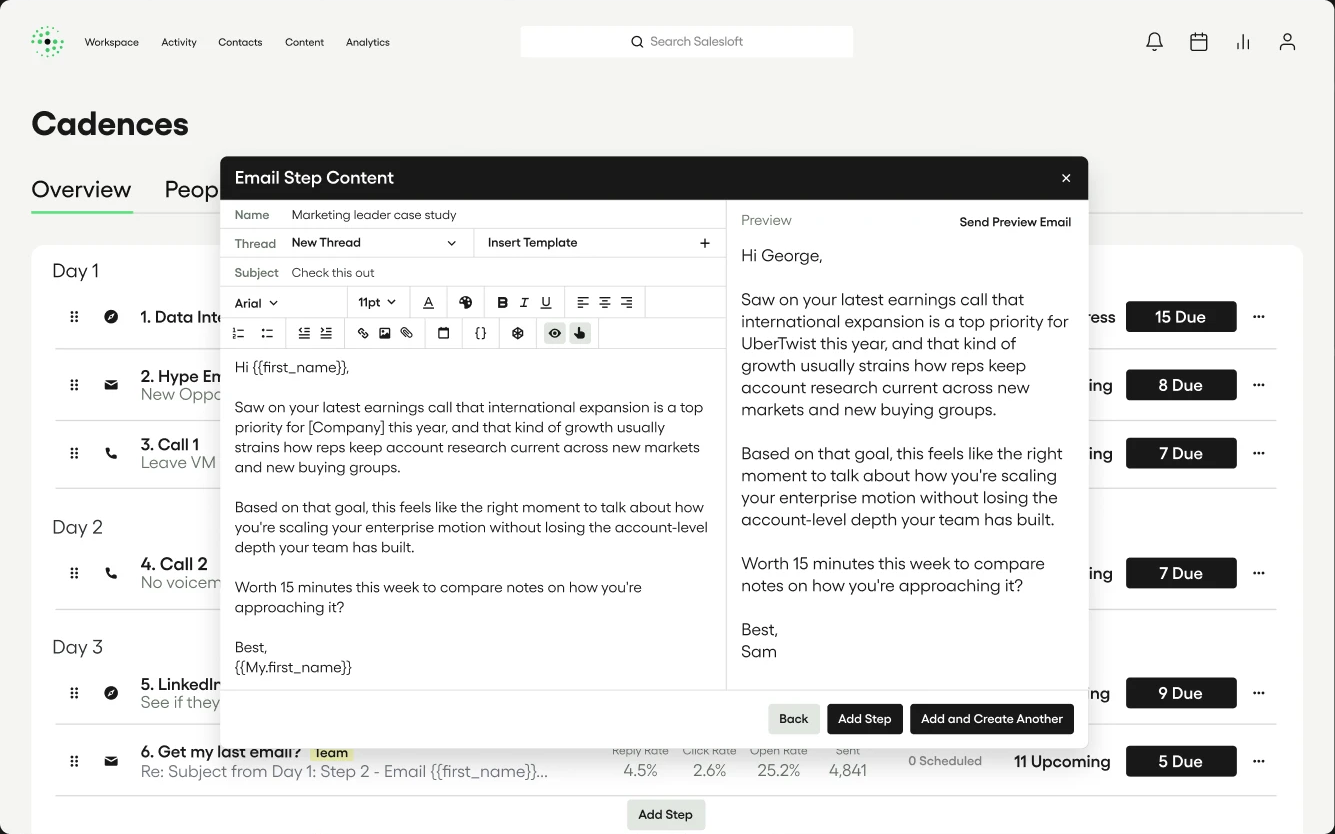
A cadence in Salesloft. A cadence mixes email, calls and social steps, with texting from the dialer and LinkedIn InMail mentioned, and reps can run any step from the mobile app. Templates and snippets keep messaging consistent while reps personalize them. An email step can hold a second template as a variant: add a variant from the step menu, pick the template and switch it on. Salesloft's guidance is to change one element at a time. Each step must keep at least one variant, and deleting one moves the people on it to the next step. A built-in dialer logs calls automatically, and Meetings lets buyers book from emails.
What we couldn't confirm. Salesloft's pricing page is a talk-to-sales form with no tiers. The help center redirected to a page that didn't load, so the step types and the variant steps come from older help articles and search summaries, and we didn't check them against the live product. Template sharing rights and current reporting are unconfirmed. Ask for a demo of template permissions and per-template reports before you buy, because you'll want to see both.
- you want a dedicated cadence tool tied to the same vendor's deal and forecasting products after the Clari merger
- you want a built-in dialer and meeting booking next to the cadence steps
- you need to read current step, permission and reporting documentation before buying: the help center did not load for us and the product page describes outcomes more than mechanics
- you want a published price: Salesloft is talk-to-sales only
How it works in practice
The product page mentions a partner marketplace and third-party integrations but names no CRM. After the merger the Clari products connect through what Salesloft calls a unified revenue data layer. We couldn't read G2 or Capterra for Salesloft. Our conversation intelligence software guide covers the Salesloft call-analysis module.
- Starting price
- Quote only: the pricing page is a talk-to-sales form with no tiers or prices
- Merger
- Clari and Salesloft merger closed 2025-12-03; unified brand announced 2026-09-02
- Step channels
- Email, calls, social; text from the dialer
Sales Engagement Inside Your CRM
CRM-native sequences run on the contact records you already hold. There's no second tool to sync, and the plan or edition you're on decides whether you have them at all.
HubSpot Sales Hub
Best for HubSpot teams on Professional
Fits a team that already runs on HubSpot CRM and wants sequences, A/B tests and reply and meeting rates on the contact record.
A sequence in HubSpot. Sequences need a Professional or Enterprise Sales Hub or Service Hub seat, and each user needs a Sales or Service seat assigned. A sequence holds automated emails (with delays of up to 90 business days), manual email tasks, call tasks and general tasks, plus LinkedIn InMail and connection-request tasks that need the Sales Navigator integration. Contacts unenroll by default when they reply or book a meeting. Dynamic sequences send automated emails and surface manual tasks only for contacts who open or click.
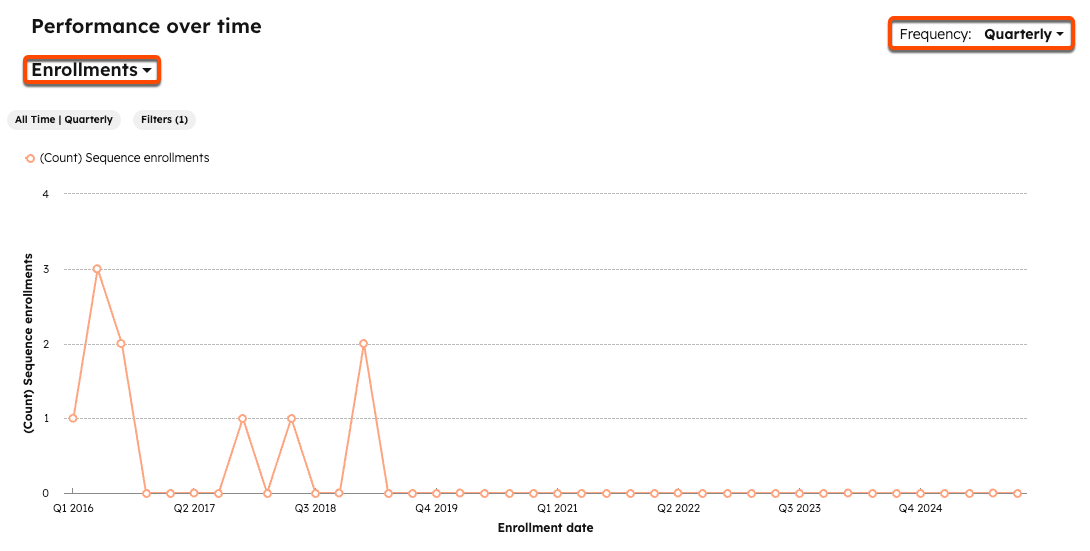
Testing and sharing. A/B tests run on sequence emails in standard sequences: up to six versions per email, four live at once, and HubSpot recommends 100 contacts per version. The sequence's Performance tab shows enrollments, reply rate and meeting rate, with a step table that includes the A/B results, and it filters by enrolling user and date. Sequences and templates are private by default, so you'll need Manage sharing set to everyone or to named teams before a rollout. A sequence that uses a private template can fail to send or render for people who can't open the template. One sequence holds at most 10 email templates.
Limits and price. Each seat can send 500 sequence emails a day on Professional and 1,000 on Enterprise, through the connected Gmail or Outlook inbox. Professional costs from $90 per seat per month (the page also shows $100) plus a $1,500 one-time onboarding fee; Enterprise starts at $150 plus $3,500. The Deal rate and Total revenue sequence metrics are Enterprise only.
- your team already runs on HubSpot CRM and wants sequences, reply tracking and meetings on the same contact record
- you want a published seat price and per-step reply and meeting rates without a second tool
- you are on Starter or Free: sequences need a Professional or Enterprise Sales Hub or Service Hub seat
- you want a contact database inside the sequence tool: sequences run on CRM contacts you already hold
How it works in practice
Sequences run on CRM contacts, and the pricing page advertises more than 2,000 connected apps. There's no contact database inside the sequence tool. Starter shows $7 and $20 per seat prices that we couldn't map to a billing option, and Starter doesn't include sequences. We couldn't read G2 or Capterra for Sales Hub in this run.
- Starting price
- Sequences need Professional: from $90 per seat per month (page also shows $100) plus a $1,500 one-time onboarding fee; Enterprise from $150 plus $3,500
- Sequences from
- Sales Hub Professional
- Send limit per seat
- 500 emails per day (Professional), 1,000 (Enterprise)
- A/B test
- Up to 6 versions per email, 4 live at once, standard sequences only
- Template cap
- 10 email templates per sequence
Salesforce Sales Engagement
Best for teams that live in Salesforce records
Fits a team that works in Salesforce all day and wants cadences and a work queue in the same org.
A cadence in Salesforce. A manager with the Cadence Creator permission set builds a cadence from email, call, LinkedIn InMail, LinkedIn connection request, task, automated email and screen-flow steps. Reps work them from the Work Queue, which shows up to 1,000 prospects at a time. Branching on a call result needs an admin to map call results first. Email steps point at a Lightning email template that has to sit in a folder the assignee can open, and merge fields are limited to sender, recipient and organization.
Sharing and testing. You share the cadence folder, not the cadence, and folder access doesn't grant access to the templates inside, so you'll need both the cadence folder and the template folder shared for a rollout. Variant testing of email templates and call scripts on one step is an admin setting, and managers compare results per variant on the cadence record. Sales Engagement Performance Dashboards run on CRM Analytics. Automated email is capped at 1,000 a day with the full permission and 100 with the basic one, and Salesforce recommends sending through Gmail or Office 365.
Price. Sales Engagement is $50 per user per month billed annually as an add-on on top of a Sales Cloud edition ($100 per user for Pro Suite, $195 for Core). The pricing FAQ says it's included in Unlimited and Agentforce 1 Sales, while the implementation guide names Performance, Einstein 1 and Unlimited. Salesforce doesn't offer trial licenses for it.
- your reps live in Salesforce records and you want cadences, the Work Queue and CRM Analytics dashboards in the same org
- you already pay for an edition that includes Sales Engagement
- you are on a base Sales Cloud edition and do not want a $50 per user add-on on top
- you want a free trial: Salesforce offers no trial licenses for Sales Engagement
How it works in practice
It works with Einstein Activity Capture, Outlook and Gmail, Open CTI dialers and LinkedIn Sales Navigator, set in Cadence Settings. An org can hold up to 500,000 active cadence targets. We couldn't read G2 for Sales Engagement, and we didn't find a view of which cadences still use an outdated template.
- Starting price
- $50 per user per month billed annually as an add-on; the pricing FAQ lists it as included in Unlimited and Agentforce 1 Sales editions
- Add-on price
- $50 per user per month, billed annually
- Automated email limit
- 1,000 per day (complete permission), 100 (basic)
- Work Queue
- Up to 1,000 prospects shown at a time
- Template access
- Lightning email templates in a folder the assignee can open
Outbound and Engagement Bundles for Small Teams
Apollo, Reply.io, lemlist and Instantly put contacts and sending in one subscription and are priced for small teams. They differ most on limits: emails per day, mailboxes, channels and which plan unlocks A/B tests.
Apollo
Best for contacts and sequences in one tool, with a free plan
Fits a small team that wants a contact database and sequences in one place and wants to try it free.
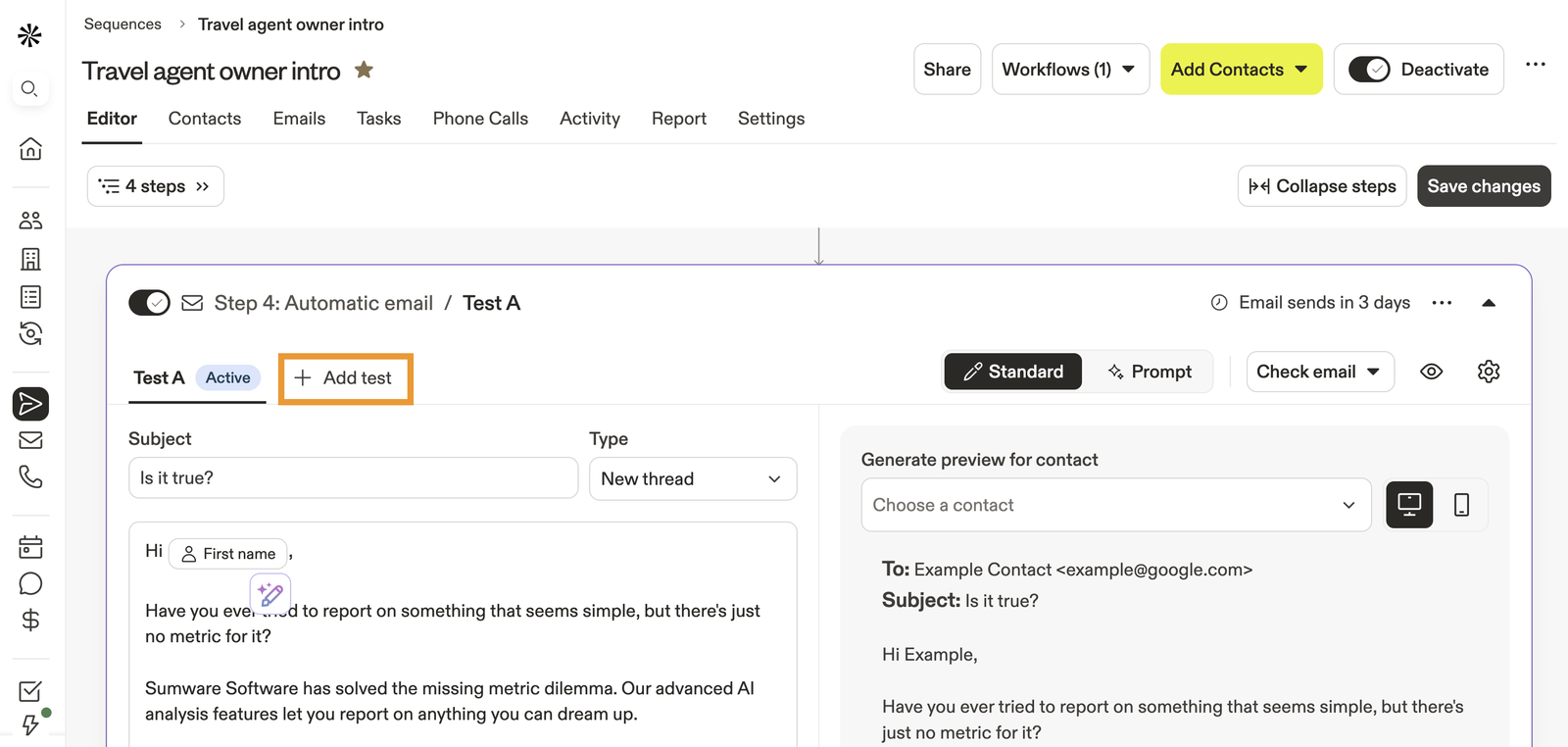
A sequence in Apollo. Start one with AI, from a template, by cloning or from scratch. Steps are automatic email, manual email, phone call, action item and LinkedIn (connection request, message, profile view, post view). Only the automatic email sends itself, and the rest become tasks the rep completes, so LinkedIn here is a reminder, not automation. Rulesets decide whether Apollo keeps sending after a reply, and the sending mailbox is picked per contact when you enroll.
Sharing and testing. Sequences can be shared with the whole organization or with named users and teams as can view, can edit or full access, and sequences and templates can sit in folders. A/Z tests work on email steps and need Professional or above. Variants are split evenly and randomly, you can't assign them to contacts, and Apollo says to wait for 90% confidence before you pick a winner. Deactivating a sequence clears its pending emails.
Limits and credits. Free allows two sequences per team, 250 emails a day and one mailbox per user. Basic ($49 per seat per month billed annually) has unlimited sequences but the same 250-a-day cap. Professional ($79) adds A/Z testing and unlimited daily emails, and Organization ($119, minimum three seats) adds more mailboxes. The contact database is paid by credits: one for an email address, eight for a phone number. The parallel and power dialers need a $119 per team monthly add-on.
- you want contacts and sequences in one tool with a free plan to test the workflow
- you want a published per-seat price and sequence sharing with view, edit and full-access rights
- you need A/Z tests or more than 250 emails a day per user: both start at Professional
- you want the dialer to be unlimited: the parallel and power dialers sit in a $119 per team add-on
How it works in practice
Apollo integrates natively with Salesforce, HubSpot, Outreach and Salesloft, and its Claude and ChatGPT connectors can draft emails into sequence steps for review. G2 shows 4.7 from 9,851 reviews; we didn't capture review themes, and we didn't find a per-template approval workflow. Our Apollo pricing guide covers credits and team costs in detail.
- Starting price
- Free plan; Basic $49, Professional $79 and Organization $119 (minimum 3 seats) per seat per month billed annually; credits and the Advanced Dialer add-on cost extra
- Free plan
- 2 sequences per team, 250 emails per day
- Sequences
- Unlimited from Basic
- A/Z testing
- Professional and up
- Email limit
- 250 per day on Free and Basic, unlimited on Professional
Reply.io
Best for branching multichannel sequences
Fits a team that wants a sequence to branch on what the prospect does and to report per step and per variant.
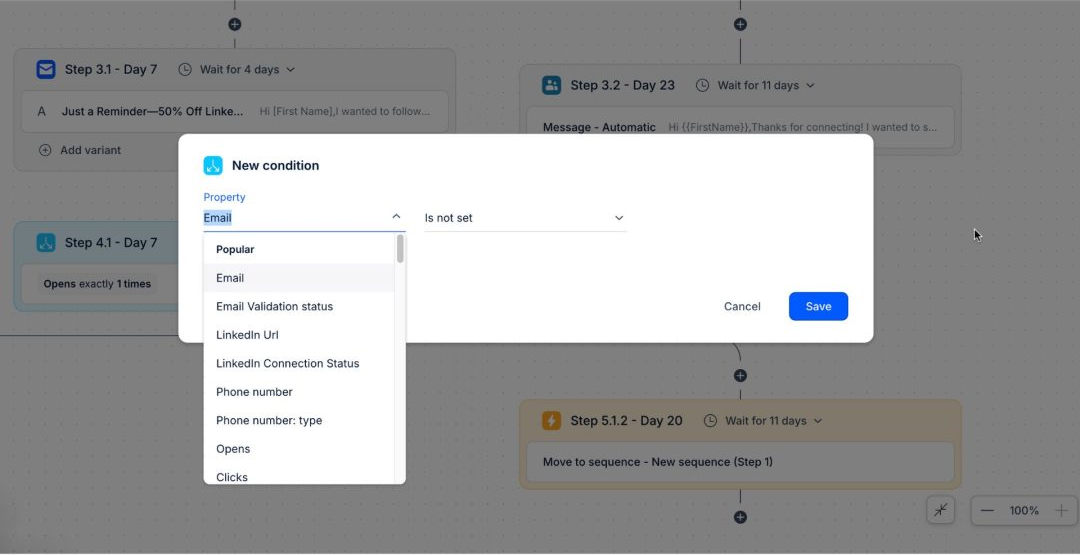
A sequence in Reply.io. Steps are email, LinkedIn, call, WhatsApp, SMS, Zapier and task, plus two logic steps: a condition, which branches yes or no on things like opened, replied, LinkedIn connected or email valid, and an action that moves the contact to another sequence. Reply checks engagement every 10 minutes within the window you set.
Testing and reporting. Email steps take A/B variants by random split, so a contact can get version A in step one and B in step two, and LinkedIn steps have their own tests. The Stats tab shows delivery, open, reply, interested, meetings booked, opt-out and bounce rates per channel, per step, per variant and per sending mailbox, with CSV export. Roles and Permissions set sequence access to team or own only, and seeing and editing are separate permissions, so a marketer can publish a sequence that reps can use but not change.
Price and limits. Email Volume starts at $49 per user per month billed annually and is email only, with 1,000 active contacts a month; LinkedIn automation is a $69 per account add-on and calls and SMS are $29. Multichannel starts at $89 and includes email, LinkedIn, calls, SMS and WhatsApp as semi-automation, with unlimited active contacts. Jason AI SDR is a separate product from $500 a month.
- you want branching sequences that react to opens, replies or a LinkedIn connection
- you want per-step and per-variant stats with CSV export and role-based sequence sharing
- you only send email and want the cheapest tier: LinkedIn automation and calls and SMS are paid add-ons on Email Volume
- you want a fully hands-off AI outbound agent inside the seat price: Jason AI is a separate product from $500 per month
How it works in practice
Reply integrates directly with Salesforce, HubSpot, Pipedrive, Copper and Close. Reply Data search covers over a billion contacts, with 50 live data credits a month on both seat plans. G2 shows 4.6 from 1,564 reviews; we didn't capture review themes. Changing a sequence owner removes the email accounts and cancels planned emails.
- Starting price
- Email Volume from $49 per user per month, Multichannel from $89 per user per month, both billed annually; the Jason AI SDR product starts at $500 per month
- Seat price
- $49 email only, $89 multichannel, per user per month annually
- Step types
- Email, LinkedIn, call, WhatsApp, SMS, Zapier, task, condition
- Data
- Built-in search over 1 billion contacts
lemlist
Best for LinkedIn and call steps with named task owners
Fits a team that wants email, LinkedIn and calls in one sequence, with manual steps assigned to a named person.
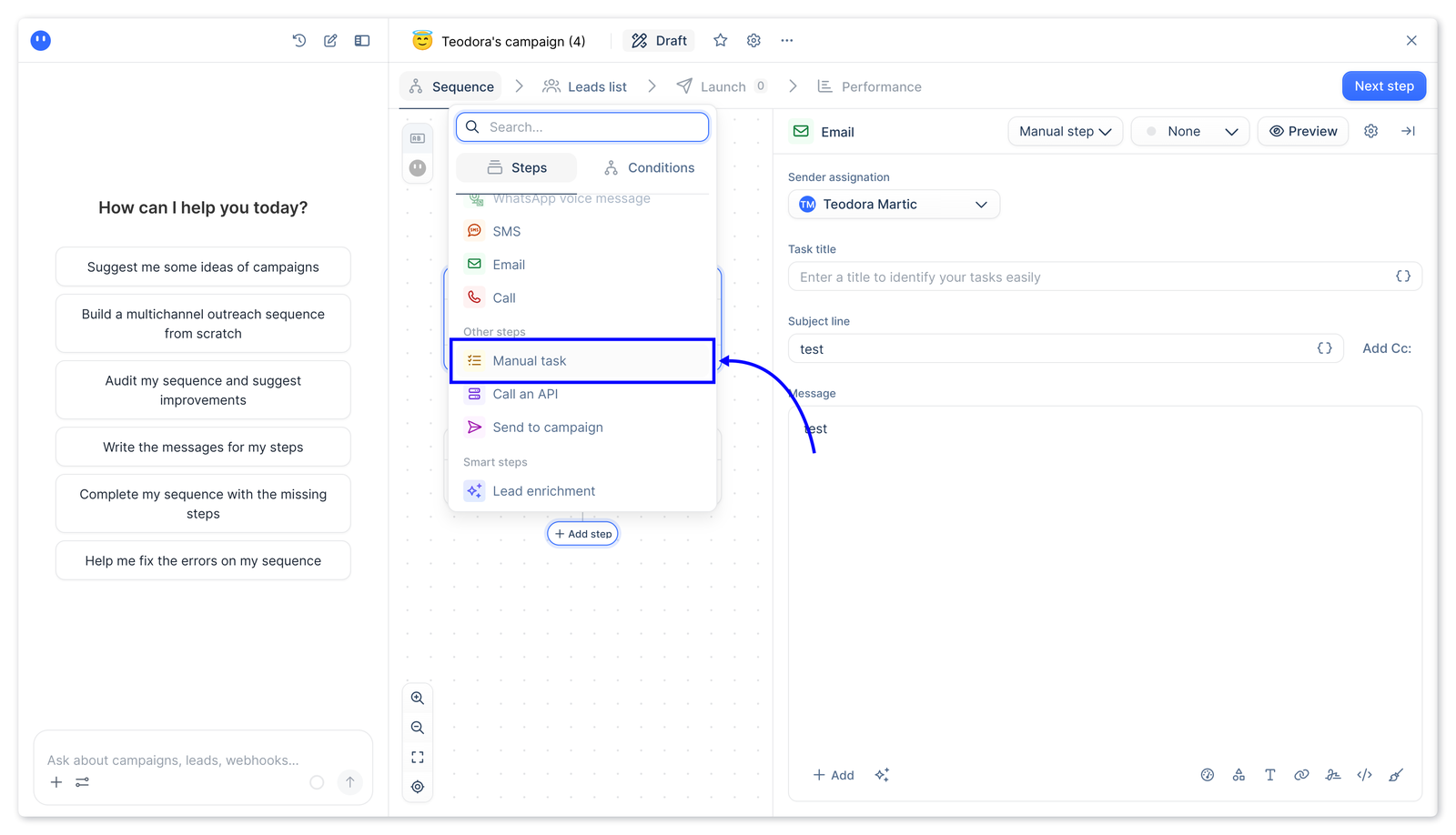
A sequence in lemlist. Multichannel sequences combine email, LinkedIn (visits, follows, invites, messages, InMail), an in-app dialer, SMS and, as an add-on, WhatsApp. Manual task steps carry an assignee, a priority, instructions and an optional delay, and they live in a Tasks section filtered by type. Marking a task Interested or Not interested stops the sequence for that lead, and Ignore doesn't.
Testing. One email step can run two variants split 50/50. You've got to set the test up before launch, because leads that are already in a launched campaign stay on version A, and picking a winner in the Performance view is permanent. lemlist also describes whole-sequence tests that vary step order and waits. We read that only in a search summary, so check it in the trial.
Price and plans. The Email plan is $55 a month on yearly billing ($69 monthly) and lists unlimited users and senders, 50,000 emails a month and no LinkedIn, call or SMS steps. Multichannel is $87 per user per month yearly ($109 monthly). Lead data is a separate credit add-on. Custom roles, permissions and SSO are Enterprise.
- you want LinkedIn, calls and email in one sequence with manual tasks assigned to a named person
- you want deliverability tooling and lead data in the same subscription
- you want LinkedIn or call steps on the cheapest plan: non-email steps need Multichannel
- you need roles, permissions and SSO: the pricing page lists custom roles and SSO under Enterprise
How it works in practice
lemlist connects to HubSpot, Salesforce and Pipedrive, to the Aircall and Ringover phone systems and to Zapier, Make, n8n and Clay. Its database lists more than 650 million leads. The pricing page claims a 4.6 rating from 2,240+ reviews, a vendor claim we couldn't check because G2 returned an error. lemlist is a product of lempire.
- Starting price
- Email plan $55 per month and Multichannel $87 per user per month on yearly billing ($69 and $109 on monthly billing); lead data and WhatsApp are add-ons
- A/B test
- Two variants split 50/50, set up before launch
- Plans
- Email, Multichannel, Enterprise
- Lead database
- 650M+ contacts, credits sold separately
Instantly
Best for high-volume cold email on a flat plan
Fits an agency or small team that sends cold email from many mailboxes and wants one plan priced by volume, not by seat.
A campaign in Instantly. Instantly is email-first. A sequence is a run of email steps, with LinkedIn and webhook steps mentioned on its outreach page, and replies land in a unified inbox called Unibox. Every plan has unlimited sending accounts and warm-up. Volume is what you pay for: 5,000 emails a month on Growth, 125,000 on Hypergrowth and 500,000 on Light Speed.
Testing. A/Z tests allow up to 26 variants per step, and an auto-optimize setting can pick the winner on reply, click or open rate. That's the most variants of the eight tools, and it suits testing a new message against several old ones. Instantly's own post doesn't say which plan unlocks it.
Where it's thin. The pages we read show no shared template library, template approval or view of which reps still send old copy. Instantly's built-in CRM has a master inbox for email, calls, SMS and tasks under one subscription with unlimited seats. The outreach plans cost $47, $97 and $358 a month on monthly billing, with a discount toggle that lowers them, and lead credits and bundles are sold separately.
- you send high-volume cold email from many mailboxes and want one flat plan instead of per-seat pricing
- you want to test many copy variants per step and auto-optimize on reply rate
- you need shared template governance for a rep team: the pages we read show no template library or approval flow
- you want call and LinkedIn cadences for reps: the product is email-first
How it works in practice
Instantly connects to HubSpot and Salesforce through its API, webhooks and no-code connectors. Its lead database is 450 million leads paid by credits. G2, Capterra and TrustRadius blocked us, so there's no rating here, and we read a vendor blog post and not a help article for the A/Z test details.
- Starting price
- Outreach plans on monthly billing: Growth $47, Hypergrowth $97, Light Speed $358 per month, priced by volume and not per seat; lead credits and bundles are sold separately
- Plans
- Growth, Hypergrowth, Light Speed by monthly email volume
- Sending accounts
- Unlimited on every plan
- A/Z testing
- Up to 26 variants per step
What Sales Engagement Software Costs and Which Plan Unlocks Sequences
Paid sales engagement software costs from $47 a month flat (Instantly's Growth plan) to $90 per seat per month (HubSpot Professional, the cheapest HubSpot tier with sequences), and six of the eight tools publish a USD price: HubSpot, Salesforce, Apollo, Reply.io, lemlist and Instantly. Outreach and Salesloft are quote only. Free options are rare: Apollo's free plan allows two sequences per team and 250 emails a day. HubSpot's free tier doesn't include sequences, and Salesforce doesn't offer trial licenses for Sales Engagement.
The plan gate clearly matters as much as the price, because the feature you bought the tool for is often one tier up.
| Tool | Sequences start at | Variant testing | Send limit | Price basis |
|---|---|---|---|---|
| Outreach | Core tier | Two templates per email step | Not published | Quote, per user plus AI credits |
| Salesloft | Not published | Email-step variants | Not published | Quote only |
| HubSpot Sales Hub | Professional | Professional, up to 6 versions per email | 500 per seat per day (Professional), 1,000 (Enterprise) | Per seat per month |
| Salesforce Sales Engagement | $50 add-on, or included in top editions | Admin setting on a cadence step | 1,000 per day with full permission, 100 with basic | Per user per month, billed annually |
| Apollo | Free plan has 2 sequences, unlimited from Basic | Professional | 250 per day on Free and Basic, unlimited on Professional | Per seat per month, plus credits |
| Reply.io | Email Volume | Email and LinkedIn steps, plan not stated | 1,000 active contacts a month on Email Volume, unlimited on Multichannel | Per user per month, plus add-ons |
| lemlist | Email plan; other channels need Multichannel | Email step, plan not stated | 50,000 emails a month on Email plan | Email plan flat, Multichannel per user |
| Instantly | Growth | Plan not stated | 5,000, 125,000 or 500,000 emails a month | Flat by volume |
For tools that mostly feed prospecting data into sequences, our guides to Apollo pricing, ZoomInfo pricing and Cognism pricing cover credits and contract terms.
How to Roll Out New Messaging Through Your Sequences
When positioning, pricing or packaging changes, the old wording stays alive in sequences that reps built months ago. The rollout below moves the new message into the sequences that are actually sending, tests it against the old one and checks who's still on the old copy. It works in any of the eight tools, though what you'll see in a report for the last step depends on the tool.
- Product marketingWrite the new first-touch and follow-up copy and the do-not-say wording, with one change per email so a test can show what worked Day 0
- EnablementPut the copy in a shared template or sequence instead of each rep's own draft, and set sharing so reps can use it but can't edit it Day 1
- AdminCheck that your plan allows A/B tests, confirm the daily send limit and, in Outreach, switch off per-rep template edits for the test Day 1 to 2
- Sales managerPick one team and enroll prospects so old and new copy run side by side in the same step Day 3
- Product marketingRead reply and meeting rates per version once each has enough sends: 150 per variant in Outreach, 100 contacts per version as HubSpot suggests Week 2 to 3
- Sales managerRetire the losing version, tell the team and search the other sequences for the old product name or price Week 3
- EnablementList which sequences still carry the old wording and check again a month later Week 4 to 5
Who's allowed to change a shared template decides whether the rollout holds. Outreach sets template rights per profile. In HubSpot, sequences and templates stay private until the creator shares them. Salesforce shares the cadence folder and the template folder separately. Apollo has can view, can edit and full access, and Reply.io separates seeing a sequence from editing it. In none of the pages we read did we find a report that lists which sequences or reps still use a superseded template, so you'll have to check by hand.
Where the approved wording lives before it reaches a sequence is a separate question. Our sales playbook software and sales enablement software guides cover it, and conversation intelligence software shows whether reps use the wording once calls start.
- New copy written with one change per email
- Do-not-say wording agreed with product marketing
- Copy saved as a shared template or sequence, view-only for reps
- Plan confirmed to allow A/B tests
- Daily send limit and mailbox limits confirmed
- One team picked and old and new copy running in the same step
- Enough sends per version before reading results
- Losing version retired and the team told
- Other sequences searched for the old name or price
- Follow-up check booked for a month later
How to Choose Sales Engagement Software
Start with where your reps already work, then check the limits that decide whether it'll fit your volume.
- Where reps work. If reps live in Salesforce or HubSpot all day, the CRM-native tools remove a sync and a login. If reps use a different CRM or none, a dedicated platform or a bundle is simpler.
- Which channels you need. Email-only teams can use any of the eight, of course. LinkedIn automation, calls and SMS push you toward Reply.io Multichannel, lemlist Multichannel or a dedicated platform, and in several tools LinkedIn is a manual task and not automation.
- Who owns the templates. If marketing must control the approved copy, check whether reps can use a shared sequence without editing it. Outreach, Apollo and Reply.io describe separate view and edit rights, and Instantly shows no shared template library.
- Send limits. Compare emails per day against your list size: 500 per HubSpot seat, 250 on Apollo Free and Basic, or monthly volume caps on lemlist and Instantly.
- Price basis. Per-seat pricing grows with headcount. Volume pricing, as at Instantly, grows with sends. Add the onboarding fees, credits and add-ons from the cost section.
- Where contacts come from. Apollo, Reply.io, lemlist and Instantly sell a contact database inside the subscription. HubSpot sequences run on contacts you already hold.
Where The GTM Lead Fits
The tools above don't tell you whether a rep has read the new message before sending it. The GTM Lead covers that earlier step for one critical change: it sends a release brief with approved messaging and a do-not-say list to your SDRs, AEs and CSMs, and shows who has viewed it, acknowledged it and answered a readiness check. It isn't a sales engagement tool, and it doesn't send emails or run sequences.
What is sales engagement software?
Sales engagement software lets sales reps run outreach as a sequence of emails, calls, LinkedIn touches and tasks. It sends the automatic steps, turns the manual ones into tasks, logs activity to the CRM and reports which messages get replies.
What is the best sales engagement platform?
The best sales engagement platform depends on where your reps work. HubSpot Sales Hub Professional and Salesforce Sales Engagement fit teams that live in those CRMs, Outreach and Salesloft are dedicated platforms bought by quote, and Apollo, Reply.io, lemlist and Instantly are priced for small teams.
What software do salespeople use?
Most salespeople work in a CRM such as Salesforce or HubSpot and run outreach through a sequencing tool such as Outreach, Salesloft, Apollo or Reply.io. Some tools combine both, because sequences can run inside the CRM.
Is Salesforce a sales engagement tool?
Salesforce is mainly a CRM, but its Sales Engagement product adds cadences and a Work Queue inside Sales Cloud. It costs $50 per user per month billed annually as an add-on, and Salesforce lists it as included in the Unlimited and Agentforce 1 Sales editions.
Is there free sales engagement software?
Apollo has a free plan with two sequences per team and 250 emails a day. HubSpot's free tier doesn't include sequences, Salesforce doesn't offer trial licenses for Sales Engagement, and lemlist and Reply.io offer 14-day trials.