Product launch software helps a team plan a launch, tell customers about it and get the people who sell and support the product ready to explain it. No single tool does all of that, so most teams end up running two or three: a project tool for the plan, a communication tool for the announcement and, for B2B products, an enablement tool for sales and customer success.
This guide compares nine tools across six launch jobs: planning, roadmap, announcement, in-app messaging, enablement and the public launch day. For each one we show what a launch looks like inside it, which plan includes the launch features and who should skip it. We read each vendor's pricing, product and help pages and a review source on October 23, 2026.
- tools compared across six launch jobs
- 9
- sell their paid plans by quote only (Productboard, Pendo, Highspot, Seismic)
- 4 of 9
- per user per month: Asana Starter, the lowest published USD seat price here
- $10.99
- per month, flat: LaunchNotes Growth, the entry plan for announcements to a page, email and Slack
- $249
Best Product Launch Software: Our Picks
Each pick does one launch job better than the rest of this list, judged by what the tool actually does on launch day, its plan limits and its review data. Most teams need a tool for the plan and a tool for the announcement, and B2B teams with a sales team add a third for enablement.
 Best for a launch plan with dependenciesAsanaTimeline with dependencies starts on the $10.99 Starter plan, and a free plan covers a two-person pilot.
 Best for a shared launch calendar across teamsAha! RoadmapsA release Gantt where product, marketing, sales and support each own their launch tasks.
 Best for announcing what shippedLaunchNotesOne draft goes to a changelog page, email and Slack, with a flat entry price.
 Best for in-app announcementsPendoLightbox, tooltip and banner guides aimed at user segments, free up to 500 monthly active users.
 Best for launch plays inside the CRMHighspot by SeismicPackages messaging, content and scorecards into a Sales Play your sellers see on their deals.
 Best free launch-day channelProduct HuntFree to launch, scheduled up to a month ahead, ranked by community votes.
 Best for proving who is ready to explain the launchThe GTM LeadNot a launch manager. It covers one gap the others leave: which SDRs, AEs and CSMs read the brief and passed the check.
Product Launch Software Compared
The table lists the nine tools in the order of the six launch jobs below. "Starting price" is the entry point for the launch features where the vendor publishes one, not the cheapest seat that leaves them out.
| Tool | Tool type | What it does on a launch | Starting price (USD) | G2 rating |
|---|---|---|---|---|
| Asana | Launch project management | Launch plan, owners and milestones in one cross-functional timeline. | Free for 2 users; Starter $10.99 and Advanced $24.99 per user/month billed annually | 4.4 (14,044) |
 monday.com monday.com | Launch project management | Launch boards, Gantt and dashboards shared across marketing, product and creative. | Free for 2 seats; Basic, Standard, Pro at 9, 12 and 19 EUR per seat/month billed annually (USD not shown on vendor page; third parties list $9, $12, $19); 3-seat minimum on paid plans | 4.7 (17,288) |
 Productboard Productboard | Product planning | Product managers bucket prioritized features into releases and roadmaps; delivery is pushed to Jira or Azure DevOps. | Business and Enterprise, quote only, per maker, minimum 5 makers; no USD list price published | 4.3 (254) |
| Aha! Roadmaps | Roadmap and launch planning | Plan the launch timeline, owners and milestones in a Gantt that product, marketing, sales and support share. | From $59 per user/month billed annually (Premium); Enterprise $99; 30-day free trial | 4.4 (369) |
| LaunchNotes | Release communication | Product marketing drafts and publishes the announcement; subscribers get it by page, email and Slack. | Growth $249/month billed annually; Premium custom; no free plan; 14-day trial after demo | 4.9 (33) |
| Pendo | In-app guides and product analytics | Announce the launched feature inside the product to the right segment and measure adoption. | Free up to 500 MAUs; Base, Core and Ultimate by quote only; 30-day trial via sales | 4.4 (1,822) |
| Highspot by Seismic | Enablement platform | Sales Plays pushed into Salesforce and Dynamics, with knowledge checks | Quote only (Good, Better, Best packages) | 4.7 (1,206) |
 Seismic Seismic | Enablement platform | Launch program, news channel, lessons and certifications in one suite | Quote only (Essential, Advanced, Ultimate) | 4.6 (1,805) |
| Product Hunt | Launch channel / community platform | Free public launch day on a daily community leaderboard | Free to launch; paid advertising on request | No reviews yet |
| The GTM Lead Our product | Release enablement acknowledgements | Shows which SDRs, AEs and CSMs are ready to explain a product change | Access code | No reviews yet |
Prices in USD per user per month unless noted, checked October 23, 2026 on each vendor's pricing page. monday.com showed us euro prices only (9, 12 and 19 per seat per month billed annually), so its row isn't in USD. Ratings are G2 values; G2 blocked direct access for several tools, so those are search-result values from October 2026 and Highspot and Seismic are the values we recorded on October 17, 2026. Product Hunt has no G2 rating we could verify.
What Product Launch Software Does
Product launch software is a set of tools that plan, coordinate and communicate the release of a new product or feature to the market, so product, marketing, sales and support work from the same plan on the same dates. The category is loose because a launch is really several jobs, and each job has its own kind of tool.
A launch tool answers three questions that a release pipeline doesn't.
- Project and roadmap software answers who does what by when, with owners, dates and dependencies across product, marketing, sales and support.
- Communication and enablement software answers who has been told, and how, through the changelog entry, the email, the in-app message and the sales brief.
- Almost no tool answers whether the team is ready, meaning the people who will answer customer questions on day one can actually do it, and it's the question most launches never check.
Product Release vs Product Launch
A release makes the product available to users; a launch makes the market aware of it and gets your teams ready to sell and support it. The two can happen on different days, and a team can release a feature quietly and launch it weeks later.
| Product release | Product launch | |
|---|---|---|
| What it's | Making the product or update available to users | Announcing, positioning and supporting it in the market |
| Owner | Engineering and product | Product marketing, with product, sales and support |
| Audience | Users who get the build | Customers, prospects and your own go-to-market team |
| Done when | The change is live | Customers know about it and your team can explain it |
| Typical tools | Issue tracker, CI/CD, feature flags | Project and roadmap tools, announcement tools, enablement tools |
Release tooling is outside this guide. If all you need is a changelog entry when code ships, one announcement tool is enough, and you'll find it below.
How Big Is the Launch?
Teams that launch often size each launch before they pick tools, because a major product launch and a small feature update need different amounts of tooling. A common split is three levels.
- A major launch covers a new product or a change that moves pricing or positioning, and it needs a full plan, an announcement, in-app messaging and enablement for sales and customer success.
- A feature launch covers a meaningful new capability, and it needs an announcement, an in-app message for the right segment and a short brief for the customer-facing teams.
- An update covers a small improvement, and a changelog entry is usually enough.
Set the level when the feature goes on the roadmap, not the week before it ships, because marketing and enablement need lead time. Our go-to-market strategy template covers the strategy side of a major launch.
The Six Jobs Inside a Product Launch
The tools sort into six jobs, and each job breaks in its own way. Buying from the wrong job is the most common reason launch software doesn't help: a better project plan doesn't tell customers what shipped, and a changelog doesn't tell your sales team what to say.
- Job 1Plan the launch
- Asana
- monday.com
Breaks when dates move and the owners downstream never hear about it - Job 2Decide what ships when
- Productboard
- Aha! Roadmaps
Breaks when the roadmap changes and the launch plan keeps the old date - Job 3Announce it
- LaunchNotes
Breaks when the announcement goes out once and nobody can find it later - Job 4Message users in the product
- Pendo
Breaks when every user sees the same banner, relevant or not - Job 5Enable sales and support
- Highspot by Seismic
- Seismic
Breaks when reps get the deck but nobody knows who has read it - Job 6Launch day in public
- Product Hunt
Breaks when the launch has no audience on the day
Job 1 and the announcement in Job 3 are the only ones every launch needs. Jobs 4 to 6 depend on what you sell: in-app messages only matter if customers use a product, enablement only matters if people sell or support it, and a public launch day mostly suits products aimed at early adopters. If enablement is the job you need, our guide to sales training software covers courses, role play and certification.
Which Tool Fits Which Launch Problem
Start from what went wrong on your last launch. This table maps the common problems to the job that fixes them and the tools in this guide that cover it.
| Problem you saw | Job | Tools to shortlist |
|---|---|---|
| Marketing found out about the ship date three days before it | Plan | Asana, monday.com, Aha! |
| The roadmap and the launch plan disagree on dates | Roadmap | Productboard, Aha! |
| Customers didn't know the feature existed | Announce | LaunchNotes |
| Users saw the feature but didn't try it | In-app | Pendo |
| Sellers gave different answers about the change | Enable | Highspot, Seismic |
| Nobody could say which reps were ready | Readiness | The GTM Lead, or the quizzes and certifications in Highspot and Seismic |
| The launch had no audience on the day | Public channel | Product Hunt |
How to Choose Product Launch Software
The vendors in this guide all say they help teams launch, so judge them on five facts you can check in a demo or a trial.
- Which job does it do? Most tools cover one job well and touch two others. Aha! plans the launch but doesn't message users. LaunchNotes announces but doesn't manage tasks. Pendo messages users in the product but doesn't plan the work.
- Which plan includes the launch features? Dependencies, approvals and release groups usually sit above the entry plan. The plan-gate table below lists each one.
- How many people need a seat? Aha! Premium bills every user, while Productboard prices per maker with a five-maker minimum. A launch involves many people who only need to view.
- Does it connect to where your team already works? Check Slack, Jira, Salesforce and HubSpot on the vendor's integration page. LaunchNotes lists no Salesforce or HubSpot integration, and Productboard's Salesforce integration needs Enterprise.
- Can you see who is ready? Project tools show task status, not whether a rep can explain the change. Ask each vendor how you would know.
In the demo, bring the plan from your last launch and ask the vendor to rebuild it live. You'll learn more from that than from any feature tour.
- Which plan includes the launch features you just demoed?
- How many seats do we need, and do viewers and reviewers cost extra?
- What does a launch look like in the tool, from the first task to the post-launch review?
- Which of Slack, Jira, Salesforce and HubSpot does it connect to on our plan?
- How do we see who has read the launch material and who can explain it?
- What happens to our launch plans and announcements if we cancel?
Launch Planning: Asana and monday.com
Asana and monday.com plan the work of a launch: tasks, owners, dates and dependencies across product, marketing, sales and support. They're the cheapest way to get a shared launch plan, and they stop at the plan: neither tells customers anything.
Asana
Best for a launch plan with dependencies
Asana runs a launch as a reusable project template with a timeline, milestones, dependencies, status updates and portfolios for several launches at once.
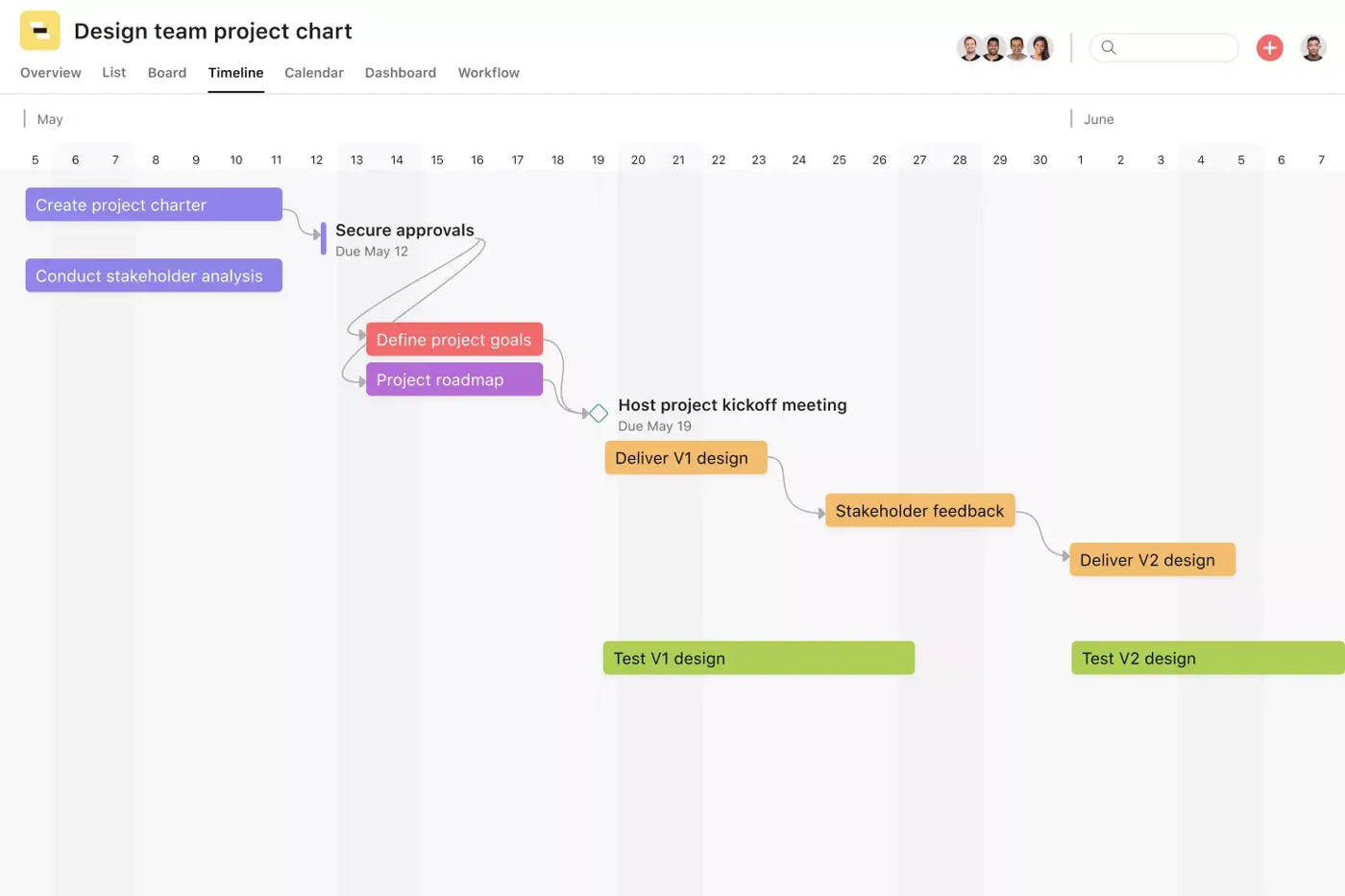
One launch in Asana. The product launches template splits the plan into pre-launch planning, release day and post-launch, with a Channel field on each deliverable so a blog post, an email and a webinar can be filtered apart. A launch activity task template lets you spawn the same set of tasks for every feature launch. On the Timeline view you link tasks with dependencies, either in the task or by dragging, and Asana notifies the owner of a downstream task when the upstream due date changes. Approvals route sign-offs, status updates keep stakeholders informed and a dashboard tracks launch KPIs. Teams running several launches roll them into a portfolio.
What it doesn't do is anything customer-facing or sales-facing. Asana's template covers the work, not the content your sellers use or whether they have read it.
- You need Gantt-style launch plans with dependencies and milestones at a modest price (Starter $10.99 annual).
- You run several launches at once and want portfolios and status updates (Advanced $24.99).
- You want a free tier for a 2-person pilot.
- You need sales content, battlecards or enablement tracking; Asana is a project tool only.
- You need approvals or branching intake forms but cannot pay for Advanced.
- You want deep customization; limited customization is the top G2 complaint theme.
- Users like
- User-friendly interface, task management and workflow features
- Users dislike
- Limited customization and a steep learning curve
- Source: G2, 14,044 reviews
How it works in practice
Asana's pricing page shows a free Personal plan for two users, Starter at $10.99 per user per month billed annually ($13.49 monthly) and Advanced at $24.99 ($30.49 monthly); Enterprise is custom. Timeline is on Starter and up. Approvals, portfolios and goals need Advanced. Basic forms come with Starter and branching logic with Advanced. Asana's help center says its launch guidance applies to Starter, Advanced and Enterprise, but its pricing page doesn't say which plan includes dependencies, so check that in the trial. Starter and Advanced include five AI requests per user per month, capped at 50 per account. Asana's app pages list Slack, Jira Cloud, Salesforce, HubSpot and Figma. G2 rates it 4.4 from 14,044 reviews; reviewers praise the interface and task management and name limited customization and a steep learning curve as the main complaints.
- Starting price
- Free for 2 users; Starter $10.99 and Advanced $24.99 per user/month billed annually
- Timeline and dependencies
- Starter and up
- Approvals
- Advanced and up
- Portfolios
- Advanced and up
- Free plan
- 2 users
monday.com
Best for visual launch boards and dashboards
monday.com offers a Product marketing launch template with board views, a Gantt and dashboard widgets, aimed at marketing, content and creative teams that like to see the whole campaign on one screen.
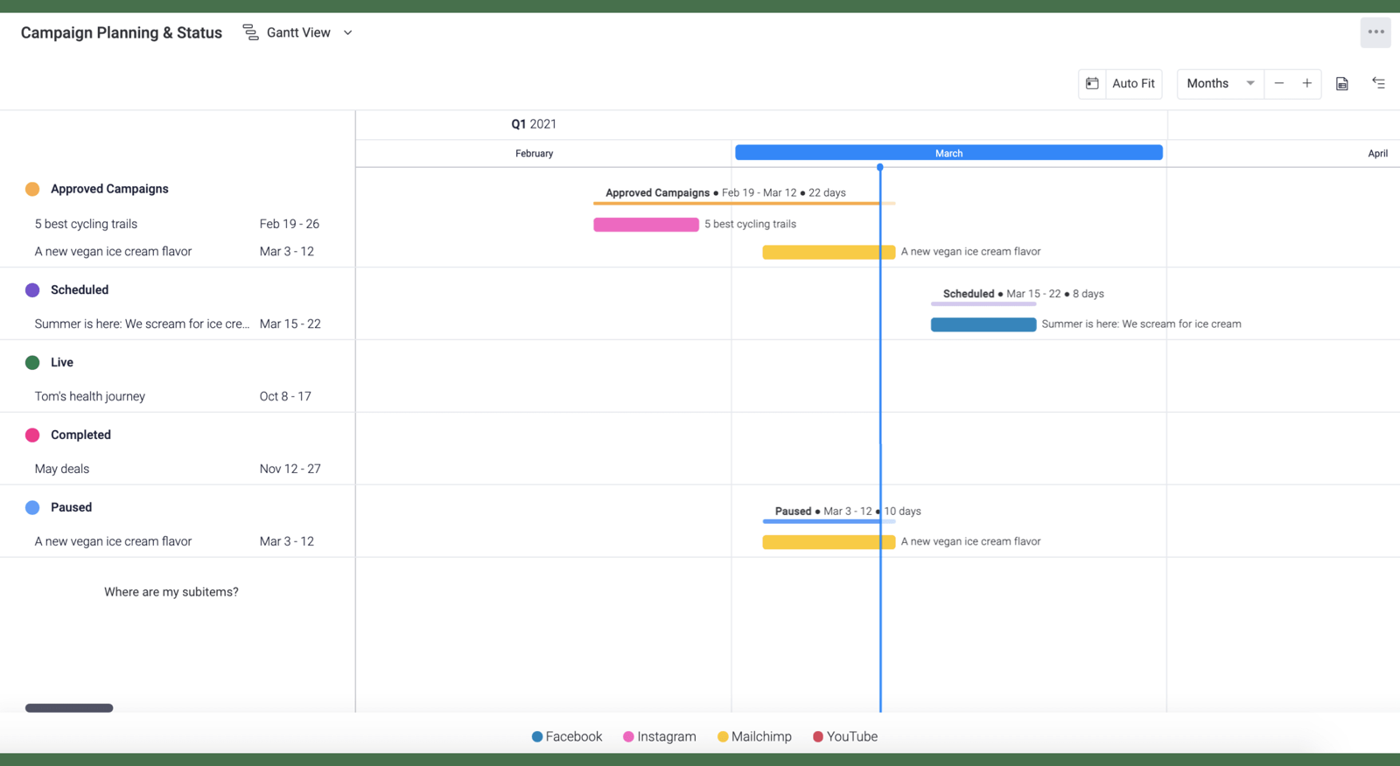
One launch in monday.com. The template page shows a launch built from boards: a Gantt view for deadlines, a Kanban view for campaign status and dashboard widgets for budget by channel and a funnel. Automations can notify people when a status changes. On the Pro plan, dependencies keep dates tied together: monday's help center says the dependency column is on Pro and Enterprise, allows one dependency column per board and doesn't fill dates for you, so someone enters them by hand. Milestones and the critical path are also Pro and up.
It suits a launch that's mostly marketing deliverables with many reviewers. Cross-launch views are the limit: portfolio and resource management are Enterprise only.
- You want visual boards, dashboards and a Gantt for a launch with marketing, content and creative teams.
- Reviewers rate ease of use highly (4.7 on G2 with 17,288 reviews).
- You need automations and dashboards across launch campaigns on Pro.
- Your team is under 3 people on paid plans; the 3-seat minimum applies.
- You need dependencies on a budget; they require Pro.
- You need cross-launch portfolios; those are Enterprise only.
- Users like
- Ease of use and team collaboration
- Users dislike
- Missing features, learning curve and limited customization; per-seat pricing complexity
- Source: G2, 17,288 reviews
How it works in practice
monday.com showed us euro prices only. Per seat per month billed annually: Basic 9, Standard 12 and Pro 19 euros, with a free plan for two seats and three boards; paid plans start at three seats and Enterprise is custom. Gantt starts on Standard, along with 250 automation and integration actions a month; Pro raises that to 25,000. Third-party sites list USD prices of $9, $12 and $19 annually, but we couldn't confirm them on monday's own pages. The vendor's integration pages list Slack, Jira, HubSpot and Microsoft Teams, and one FAQ says the Salesforce integration is Enterprise only. G2 rates monday.com 4.7 from 17,288 reviews, with ease of use and collaboration as the strengths and missing features and a learning curve as the complaints.
- Starting price
- Free for 2 seats; Basic, Standard, Pro at 9, 12 and 19 EUR per seat/month billed annually (USD not shown on vendor page; third parties list $9, $12, $19); 3-seat minimum on paid plans
- Gantt
- Standard and up
- Dependencies
- Pro and up
- Portfolios
- Enterprise only
- Seat minimum
- 3 on paid plans
Roadmap to Launch: Productboard and Aha!
Productboard and Aha! sit closer to product management. They decide what ships and when, and they connect that to the launch. Pick one if the launch date keeps moving because the roadmap moves.
Productboard
Best for tying launches to customer feedback
Productboard collects customer feedback, ranks features against it and groups them into releases on shareable roadmaps, then pushes the releases to Jira or Azure DevOps.
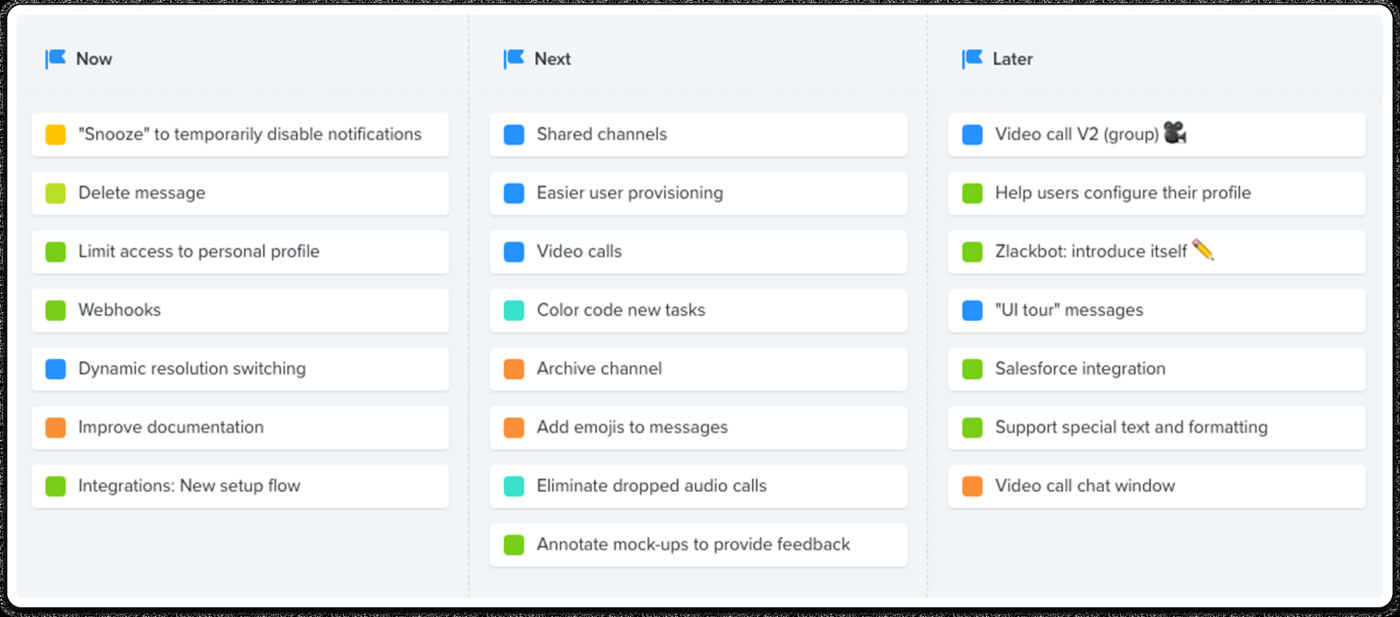
One launch in Productboard. A product manager prioritizes features against feedback, then drops them into a release: a free-form bucket on a board with the status Upcoming, In progress or Completed. Releases are created from the Library or by adding release columns, and they can link initiatives, features and subfeatures. Admins and editors can push a release to Jira and sync it to Fix versions. Stakeholders and customers see the plan on a shareable roadmap, and the customer portal shows it externally. Productboard's own documentation advises against fixed dates far in the future.
Productboard plans what ships. We found no way to publish a launch announcement or changelog from it, and no launch tasks or checklists for marketing, so it works next to a tool from the other jobs, not instead of one.
- Product managers decide what ships using customer feedback and need roadmaps tied to Jira or Azure DevOps
- You need Salesforce-synced customer insight feeding the plan (Enterprise gating applies)
- Revenue and enablement teams need shareable roadmaps showing what ships when
- You need to publish launch announcements, changelogs or subscriber emails (not found)
- You want published USD pricing or a self-serve start
- You need HubSpot sync (not found) or release groups below Business
- Users like
- Easy to use, feedback organized and tied to features, strong roadmap views
- Users dislike
- Expensive, mostly suited to mid-to-large companies; no automatic customer updates as features progress
- Source: G2, 254 reviews
How it works in practice
Productboard sells Business and Enterprise plans by quote, per maker with a minimum of five makers, and annual billing saves 21 percent; we found no USD list price and no free trial on the pricing page. Releases are on every plan, but release groups need Business or Enterprise. Business includes 25 contributors, two portals and five Jira and five Azure DevOps integrations; Enterprise lifts those limits and adds the Salesforce integration, SAML and audit logs. The AI agent runs on credits, 500 per maker per month on Business. G2 rates Productboard 4.3 from 254 reviews and Capterra 4.7 from 153 (both search-result values). Reviewers like the organized feedback and roadmap views; the main complaint is price, and some wish customers were updated automatically as features progress.
- Starting price
- Business and Enterprise, quote only, per maker, minimum 5 makers; no USD list price published
- Pricing unit
- Per maker, 5-maker minimum
- Releases
- All plans; release groups on Business and up
- Salesforce
- Enterprise only
- Jira
- Push a release to Fix versions
Aha! Roadmaps
Best for a shared launch calendar across teams
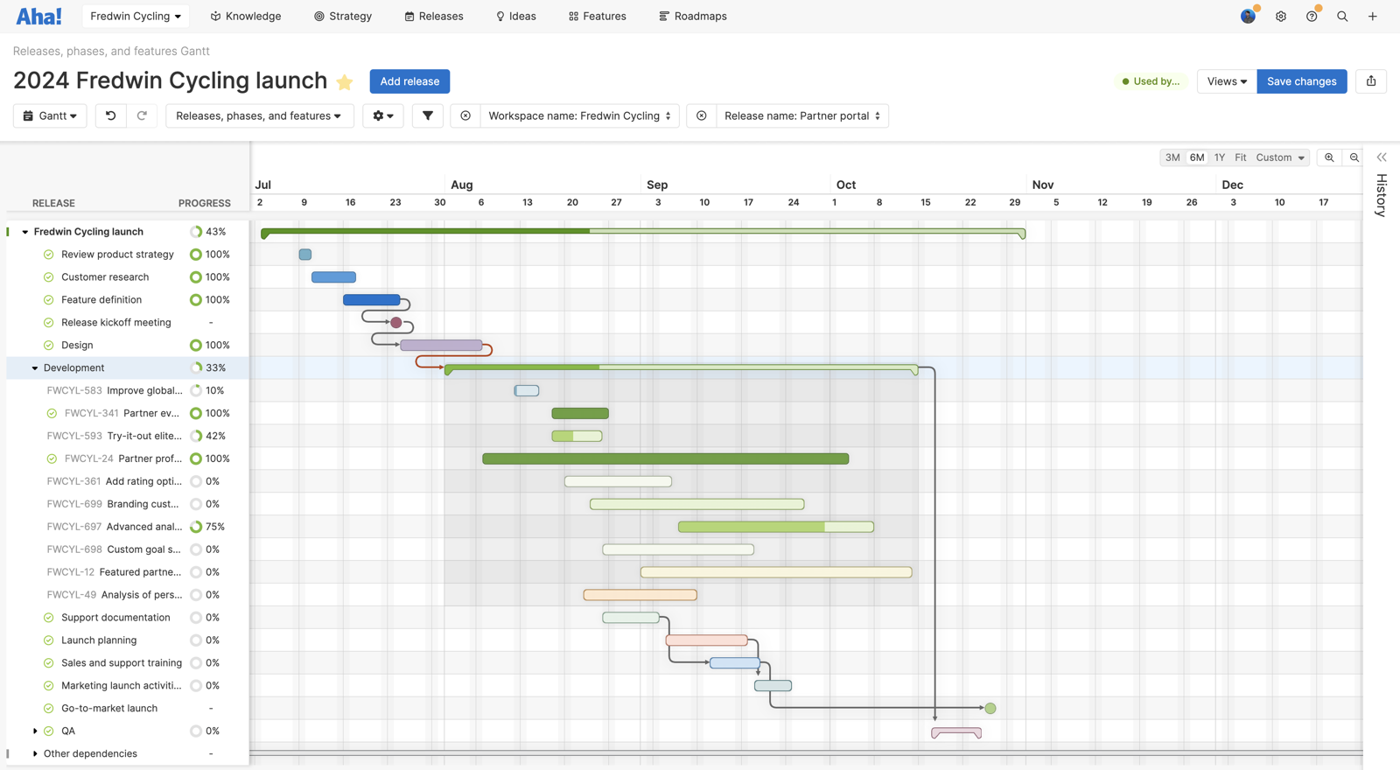
Aha! Roadmaps plans a launch as a release with phases, milestones and a Gantt, and gives product marketing, sales and support their own launch tasks inside the same plan.
One launch in Aha! Product creates a release with a target launch date, adds phases, milestones and features and shows it on the roadmap and a release calendar. Aha!'s launch management guide then walks product marketing through six steps: a release timeline, a kickoff, a detailed Gantt plan with owners and due dates, tracking with automatically calculated progress, a burndown chart and delivery risk alerts, and a run-of-show note and retrospective report after the launch. Each team plans its own deliverables, such as sales training, internal announcements and marketing launch activities, and the roll-up release combines them. Aha! also has a product launch plan template and release templates for repeating the structure.
It coordinates the work and the dates. It doesn't message users in your product, and release notes are a separate use case.
- Product marketing needs a shared launch calendar with owners and dependencies across teams
- You want reusable launch plan templates and post-launch retrospective reports
- Your team already runs Jira or Azure DevOps and wants the roadmap linked to delivery
- You need in-app announcements shown to customers
- Many stakeholders only need to view, since Premium bills every user and free viewers need Enterprise at $99
- You want a fast setup, as reviewers cite a steep learning curve
- Users like
- Responsive customer support and ease of use; strong customization and Jira/Azure DevOps integration
- Users dislike
- Steep learning curve from the large feature set; some missing features and price concerns
- Source: G2, 369 reviews
How it works in practice
Aha! Roadmaps costs $59 per user per month billed annually on Premium ($74 monthly) and $99 on Enterprise ($124 monthly); Enterprise+ is $149 and annual only. There's no free plan, but a 30-day trial needs no card. Premium bills every user; on Enterprise, unlimited free reviewers and viewers are included and only owners and contributors are paid seats. Aha! says prices rise 3 percent a year. Team capacity planning and automation rules need Enterprise+. Its pages list more than 40 integrations, including Jira, Azure DevOps, Slack and Figma. G2 rates Aha! 4.4 from 369 reviews: support and ease of use are praised, the learning curve and missing features criticized, and one recent review calls it overpriced.
- Starting price
- From $59 per user/month billed annually (Premium); Enterprise $99; 30-day free trial
- Pricing unit
- Per user per month
- Free plan
- None, 30-day trial
- Launch Gantt
- Release phases, milestones, dependencies
- Free viewers
- Enterprise and up
Announcing the Launch: LaunchNotes
Customers can't use what they don't know about. This job is the announcement itself, and there is one dedicated tool for it in this guide.
LaunchNotes
Best for announcing what shipped
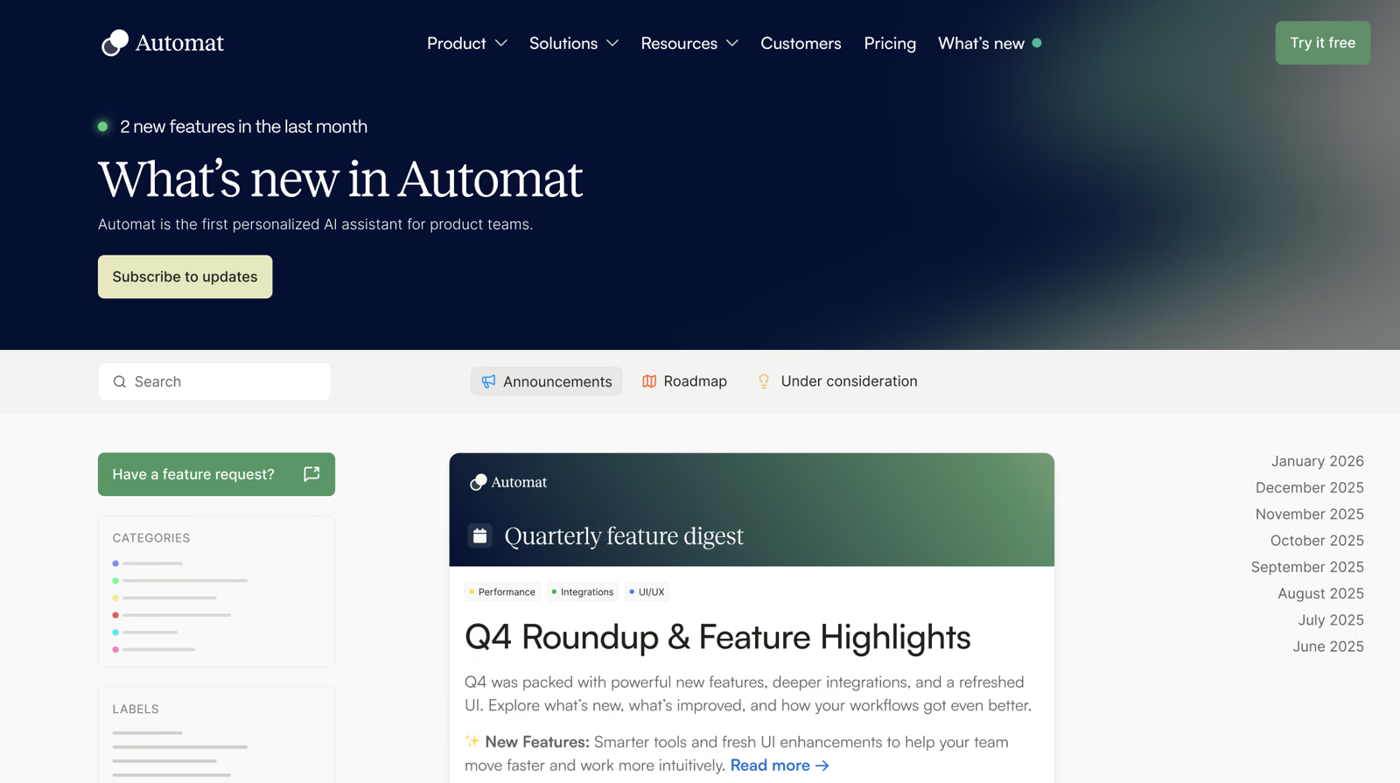
LaunchNotes turns shipped work into announcements, a public changelog and a roadmap, published once to a page, email and Slack.
One launch in LaunchNotes. A product marketer or product manager starts a draft, adds a title, content, hero image, categories and labels, or has the AI writer draft it from Jira tickets or a Loom video. A Publishing Channels card turns the page, email and Slack on or off per announcement. Email and Slack need at least one category or cohort, so subscribers only get what they signed up for. You preview the page, send a test email to up to five addresses, then publish now or schedule. If you edit the entry later, the page and widget update but emails that already went out don't. A linked roadmap item moving to shipped can notify the people who asked for it.
It covers the communication layer only. We found no launch checklists, task owners or launch levels in it.
- Your main job is telling customers and internal teams what shipped across page, email and Slack
- You want a public changelog plus roadmap with ship notifications at a flat entry price
- Your engineering work lives in Jira and you want updates drafted from tickets
- You need Salesforce or HubSpot sync (not on its integrations page)
- You need launch checklists, task owners and cross-team launch tiers (not found)
- You need advanced segmentation, multiple pages or white-labeling without custom Premium pricing
- Users like
- Keeps customers and internal teams informed, easy to use
- Users dislike
- Wants more integration options
- Source: G2, 33 reviews
How it works in practice
LaunchNotes Growth costs $249 per month billed annually and includes one page, two users, one custom domain and 5,000 emails a month through LaunchNotes; Premium is custom and adds multiple pages, bring-your-own email provider, advanced segmentation, white-labeling and audit logs. There's no free plan, and the 14-day trial is set up after a 30-minute demo. Its integrations page lists Slack, Microsoft Teams, Jira, Confluence, Intercom, Notion, Zapier and an API; we found no Salesforce or HubSpot integration. G2 shows 4.9 from 33 reviews (search-result value): reviewers say it keeps customers and internal teams informed and is easy to use, and the main complaint is wanting more integration options.
- Starting price
- Growth $249/month billed annually; Premium custom; no free plan; 14-day trial after demo
- Channels
- Page, email, Slack
- Entry plan
- Growth: 1 page, 2 users, 5,000 emails a month
- Advanced segmentation
- Premium only
- Free plan
- None, 14-day trial after a demo
In-App Launch: Pendo
Once the feature is live, the most relevant audience is already inside your product. This job is telling those users, and only the ones it matters to.
Pendo
Best for in-app announcements
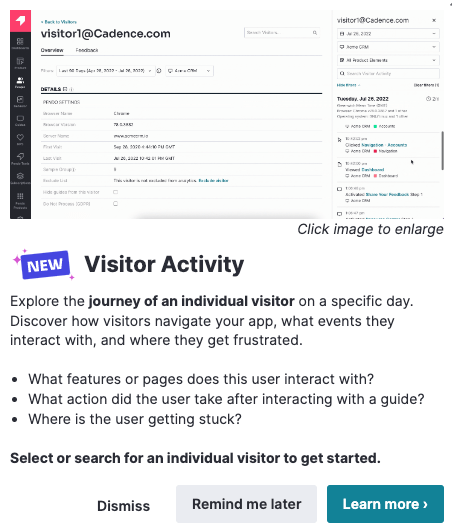
Pendo shows feature announcements inside the product as lightboxes, tooltips and banners aimed at user segments, and tracks adoption of the feature afterward.
One launch in Pendo. Someone with Guide Creator rights opens Guides, picks the app, chooses an overlay layout and builds the message from blocks such as text, buttons, images, polls and video. They set where and when it shows, choose the segment, preview it, stage it and hand it to a Publisher who publishes or schedules it. Pendo's own guidance matches the format to the launch: a lightbox for a major announcement, a tooltip for a smaller release and a banner for something time-sensitive. You can aim an announcement at the segment most likely to value the feature and then check usage of that feature in the same product.
Pendo doesn't plan the launch project, and we found no task, owner or milestone features in its documentation.
- You need targeted in-app announcements for feature launches
- You want to measure feature adoption in the same tool
- You want to try a free plan (500 MAU cap) before talking to sales
- You need a launch plan with owners, milestones and dependencies
- You need public list pricing, since paid plans are quote only
- You need A/B tests, guide logic or full Resource Center announcements, which require Guides Pro
- Users like
- Ease of use and analytics insights that help teams build in-app guides
- Users dislike
- Missing features and limitations; complex setup, especially multi-condition announcements
- Source: G2, 1,822 reviews
How it works in practice
Pendo's free plan covers up to 500 monthly active users, and above that you can't create new guides or segments. Base, Core and Ultimate are quote only, based on monthly active users and features, and a 30-day trial goes through sales. We found no USD prices for the paid plans. Guides and Guides Pro both include web and mobile guides, scheduling and ordering; A/B experiments, guide logic, cross-app guides and the full Resource Center announcements module need Guides Pro. G2 rates Pendo 4.4 from 1,822 reviews, praising ease of use and insights, and naming missing features, limitations and a complex setup as the downsides; a recent review says multi-condition announcements get confusing.
- Starting price
- Free up to 500 MAUs; Base, Core and Ultimate by quote only; 30-day trial via sales
- Free plan
- Up to 500 MAUs
- Paid plans
- Base, Core, Ultimate, quote only
- A/B tests and guide logic
- Guides Pro
- Trial
- 30 days via sales
Enabling the Revenue Team: Highspot and Seismic
In a B2B launch, the sellers and customer success managers are the audience that decides whether customers hear the right answer. Highspot and Seismic package launch content, training and messaging for them. Highspot is now part of Seismic after a merger that completed in August 2026, but both products are still sold under their own names. For the wider category, see our guide to sales enablement software.
Highspot by Seismic
Best for launch plays inside the CRM
Highspot packages a launch as a Sales Play: the content, the messaging and the scorecards in one place, shown to sellers inside Salesforce or Microsoft Dynamics.
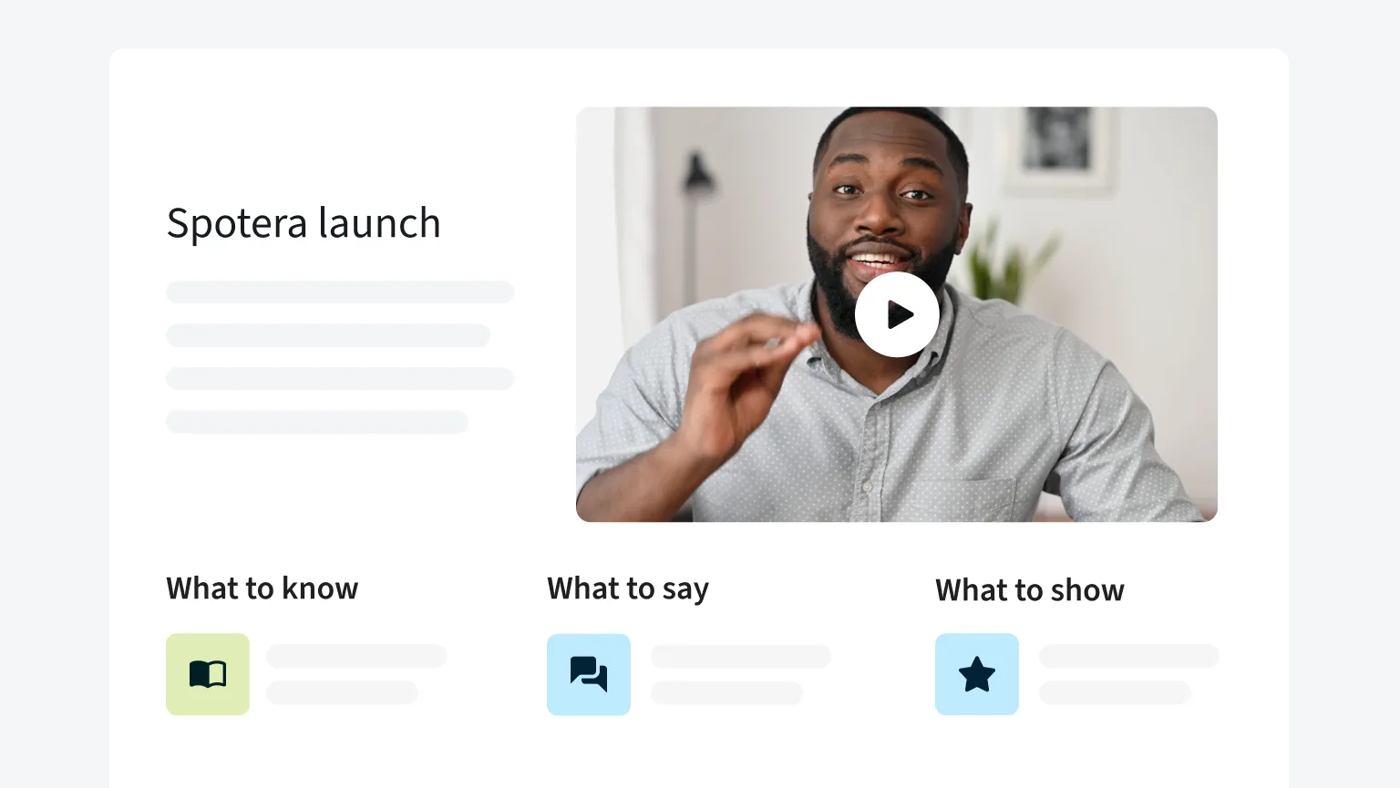
One launch in Highspot. An enablement manager builds a play for the launch. Highspot's product page shows a play with three parts: what to know, what to say and what to show. The play links the launch content, and Highspot surfaces it inside the CRM, so sellers find it where they work instead of searching a library. Scorecards track whether the play is being used, such as how many reps completed certification, and AI knowledge checks test whether sellers can explain the launch content. After the launch, the same scorecards show where adoption lags. If the launch play needs a home first, our guide to sales playbook software maps what seven tools call a playbook.
It measures use and knowledge of content. It isn't a launch plan and it doesn't publish to customers.
- you want launches packaged as plays that show up on the right deals in Salesforce or Dynamics
- you want AI knowledge checks on launch content without buying the training tier
- you need courses, adaptive learning and automated nudging but plan to buy the entry package: those start at Better
- you're about to sign a multi-year deal and want roadmap certainty before Seismic publishes its combined plan
- Users like
- Ease of use
- Users dislike
- Learning curve and keeping content current
- Source: G2, 1,206 reviews
How it works in practice
Highspot is sold by quote in Good, Better and Best packages, and Sales Plays are in the entry package. Courses, adaptive learning and automated nudging start at Better, so the checks on launch content are available early but certifications aren't. The homepage now reads Highspot by Seismic. G2 rated Highspot 4.7 from 1,206 reviews when we recorded it on October 17, 2026; reviewers praise ease of use and name the learning curve and keeping content current as the work.
- Starting price
- Quote only (Good, Better, Best packages)
Seismic
Best for running several launches a year
Seismic Enablement Cloud puts the launch program, the content, the lesson and the certification in one suite, and has a product launch use case of its own.
One launch in Seismic. Seismic describes its product launch use case as planning, executing and streamlining every launch, so customer-facing teams have the content, training and guidance they need from day one. In the suite, an enabler designs a program with a structured plan that aligns product, marketing and sales. Marketing publishes approved launch content from one library, Seismic Learning, the former Lessonly, delivers the lessons, role-play practice lets reps rehearse the new pitch, and a company-news channel tells the field what is new. Program reporting then shows how the launch content was used.
It's a platform, so it fits teams with several launches a year better than a one-off feature launch.
- you run several launches a year and want the program, the announcement, the lesson and the certification tracked in one place
- your sellers live in Salesforce or Microsoft Teams and need launch content surfaced there
- you're buying the Essential package expecting training: lessons, certifications and the Role-Play Agent need an add-on there
- your CRM is HubSpot and you can't test the connection first: Seismic's main integrations page leads with Salesforce and Microsoft
- Users like
- Document management and ease of use
- Users dislike
- Navigation and admin setup
- Source: G2, 1,805 reviews
How it works in practice
Seismic is quote only, in Essential, Advanced and Ultimate packages. The Essential package doesn't include lessons, certifications or the Role-Play Agent, which need an add-on there. The main integrations page leads with Salesforce and Microsoft, so test a HubSpot connection first. We couldn't find a Seismic product screenshot on the vendor's launch or programs pages, which show only stock photography, so this entry has no image. G2 rated Seismic Enablement Cloud 4.6 from 1,805 reviews when we recorded it on October 17, 2026, with document management and ease of use praised and navigation and admin setup as complaints.
- Starting price
- Quote only (Essential, Advanced, Ultimate)
Launch Day in Public: Product Hunt
Product Hunt is a channel, not software you run a launch in. It belongs in this guide because it's the launch-day destination for a lot of early-adopter products, and it's free.
Product Hunt
Best free launch-day channel
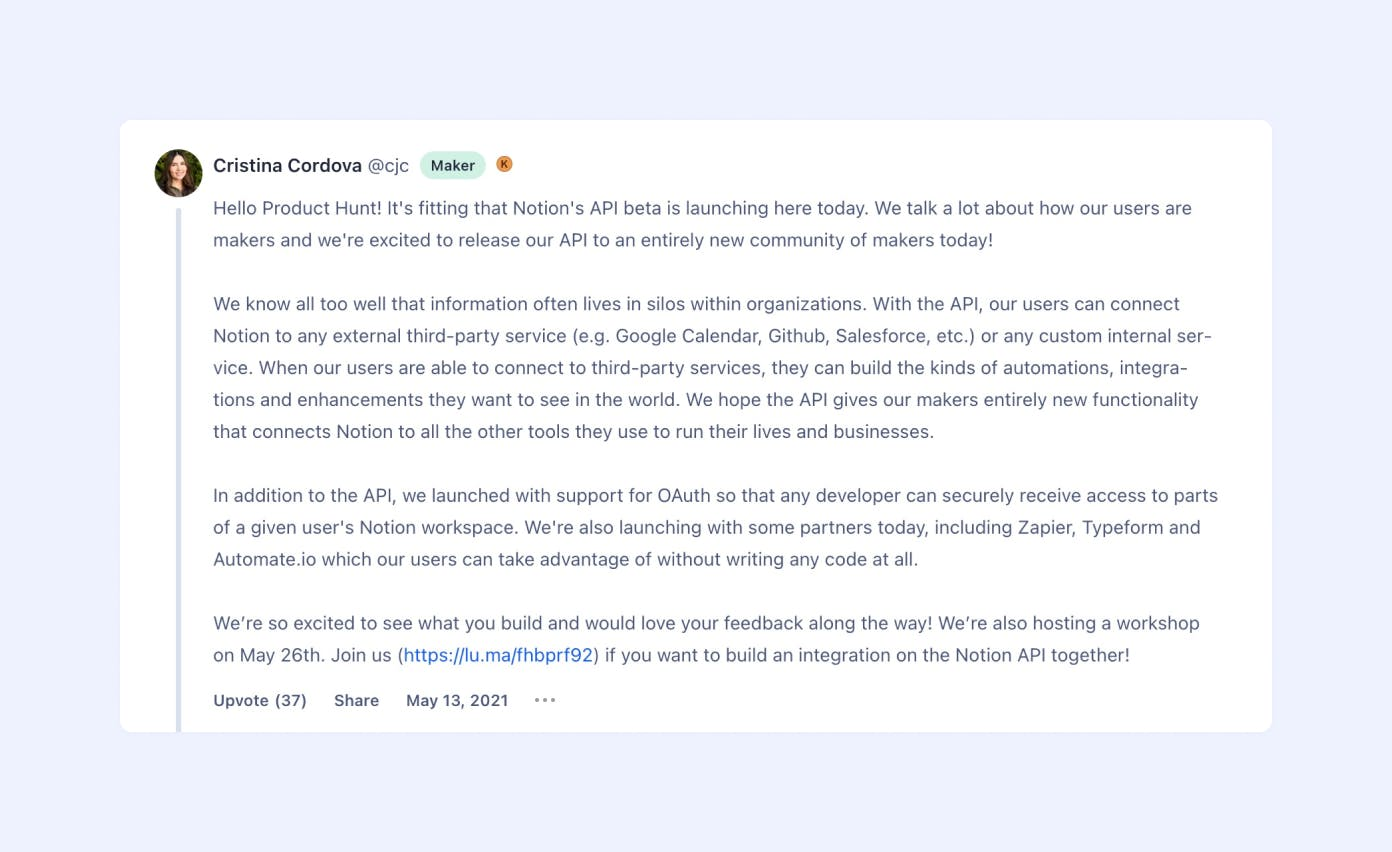
Product Hunt is a community site where makers submit a product and compete on a daily leaderboard ranked by votes and comments.
One launch on Product Hunt. You prepare the page, the assets and a first comment from the maker, then submit. Product Hunt recommends launching at 12:01 am Pacific, because its homepage runs on a 24-hour cycle in Pacific time, and you can schedule a launch up to a month ahead or launch right away. Products compete on the daily leaderboard for places such as Product of the Day. Product Hunt says a third-party hunter gives no discernible advantage and encourages makers to submit their own product. Company accounts aren't allowed, so a person from the team submits it. Asking people directly for upvotes isn't allowed either, which is why the work is in the community you bring on the day.
It does nothing for your internal launch. There's no plan, no enablement and no way to see who on your team is ready.
- You want free public visibility on launch day among founders, startup teams and tech early adopters
- You can schedule up to one month ahead and prepare a first comment and your own community
- You want a low-cost channel to add alongside internal launch tooling
- Your buyers are enterprise sales or enablement leaders rather than founders and engineers
- You need internal launch planning, sales content or enablement workflows
- You cannot mobilize an audience, since asking directly for upvotes is not allowed
How it works in practice
Launching is free. Product Hunt sells advertising and newsletter sponsorships separately, without published USD prices. Its own materials describe the audience as mostly founders, leaders and engineers, so it suits products those people buy. G2 lists Product Hunt with 18 reviews, but we couldn't verify a rating, and we found no Capterra listing.
- Starting price
- Free to launch; paid advertising on request
- Cost to launch
- Free
- Recommended launch time
- 12:01 am Pacific
- Scheduling
- Up to one month ahead
- Company accounts
- Not allowed
Which Plan Includes the Launch Features
Launch features often sit above the entry plan. This table shows where each tool draws the line, from the vendors' pricing and help pages.
| Tool | Entry plan includes | Needs a higher plan |
|---|---|---|
| Asana | Timeline and unlimited automations on Starter ($10.99) | Approvals, portfolios and branching forms on Advanced ($24.99) |
| monday.com | Gantt view on Standard | Dependencies, milestones and critical path on Pro; portfolios on Enterprise |
| Productboard | Releases on every plan | Release groups on Business; Salesforce integration on Enterprise |
| Aha! | Launch planning on Premium ($59); plan gating for launch features isn't stated | Free viewers and reviewers on Enterprise ($99); capacity planning on Enterprise+ ($149) |
| LaunchNotes | Announcements to page, email and Slack on Growth ($249 a month) | Multiple pages, advanced segmentation and white-labeling on Premium |
| Pendo | Guides on the free plan, up to 500 monthly active users | A/B experiments, guide logic and the full Resource Center on Guides Pro |
| Highspot | Sales Plays in the entry package | Courses, adaptive learning and nudging from Better |
| Seismic | Launch content and program tools in the suite | Lessons, certifications and role-play need an add-on on Essential |
| Product Hunt | Everything, free | Not applicable |
How Much Product Launch Software Costs
A shared launch plan costs from nothing to about $25 per user per month, and each extra job adds its own bill. Published prices for planning tools run from free plans to $10.99 and $24.99 per user per month on Asana and $59 and $99 on Aha!. LaunchNotes starts at $249 a month for the whole team. Productboard, Pendo's paid plans, Highspot and Seismic are quote only, and Productboard has a minimum of five makers.
Is There Free Product Launch Software?
Yes, for the plan and the launch day. Asana's Personal plan is free for two users, monday.com has a free plan for two seats and three boards, Pendo's free plan covers up to 500 monthly active users and Product Hunt is free to launch on. The announcement job has no free option in this guide, and a free plan won't cover a team that shares a plan across product, marketing and sales.
Product Launch Checklist for the Revenue Team
Most launch checklists end on launch day. For a B2B product the harder part is the week after, when customers ask your sellers and customer success managers about the change. This checklist covers the revenue team's side. Tool names are examples from this guide, and the steps work in a spreadsheet.
- Pick the launch level (major launch, feature launch or update) when the feature goes on the roadmap
- Name one owner for each job: plan, announcement, in-app message, enablement
- Write the approved messaging and the things nobody should say, such as unreleased dates or discounts
- Put the plan and the dates where the revenue team can see them (Asana, monday.com or Aha!)
- Schedule the announcement and the in-app message for the same day (LaunchNotes, Pendo)
- Send the brief to SDRs, AEs and CSMs before the announcement, not after
- Ask one question that proves they can explain the change to a customer
- Collect the questions customers actually ask in the first week and update the brief
- Review after 30 days: which jobs went smoothly, and which team learned late
Where The GTM Lead Fits
The checklist above has a step none of the tools in this guide checks: whether the people who talk to customers are ready. Our own product, The GTM Lead, covers that one step. It sends one release brief with the approved messaging and the "don't say" caveats to your SDRs, AEs and CSMs. They read it, acknowledge it and answer a short readiness check, so you can see who is ready before customers start asking. It doesn't plan launches, publish announcements or replace an enablement platform, and it isn't a launch manager or a learning management system.
FAQ
What is product launch software?
Product launch software is a set of tools that plan, coordinate and communicate the release of a product or feature to the market. A launch has several jobs, planning, announcing, in-app messaging, enablement and a public launch day, so most teams combine a project or roadmap tool with an announcement tool and, for B2B products, an enablement tool.
What is the difference between a product release and a product launch?
A release makes the product available to users. A launch makes the market aware of it and prepares your sales, support and customer success teams to explain it. A feature can be released quietly and launched weeks later.
How do you successfully launch a new product?
Set the launch level early, name one owner for each job, write the approved messaging, tell the revenue team before the announcement, send the announcement and the in-app message on the same day and review the launch after 30 days. The checklist in this guide covers the revenue team's side.
How long does a product launch take?
A product launch takes as long as its level demands. A small update can go out with a changelog entry the day it ships, while a major launch needs lead time for marketing, enablement and the revenue team. Set the level and the plan when the feature goes on the roadmap, not the week before it ships.
Where should you announce a product launch?
Announce a product launch in the channels your customers already read: an announcement or changelog page, email to the affected segment, an in-product message for active users and a brief to your own sales and support teams. Products for early adopters can add a public launch such as Product Hunt. LaunchNotes covers the page and the email, and Pendo covers the in-product message.
How much does product launch software cost?
A shared launch plan runs from free to $10.99 or $24.99 per user per month on Asana, and $59 or $99 on Aha!. LaunchNotes starts at $249 a month. Productboard, Highspot, Seismic and Pendo's paid plans are quote only. Parts of the job are free: Asana has a free plan for two users, monday.com for two seats, Pendo covers up to 500 monthly active users and Product Hunt is free to launch on.