Sales analytics software turns the data in your CRM, your recorded calls and your quota plans into answers about pipeline, conversion, win rate, sales cycle length and forecast accuracy. Most teams don't get those answers from one tool. They get them from the reports inside the CRM, a BI tool or revenue intelligence platform on top of it, and sometimes a separate system for commission data.
This guide compares nine tools across those four layers. For each one we show how a single question gets answered, such as which stage leaks pipeline or why win rate dropped, including where the data comes from, who has to build the report, what's prebuilt and which plan unlocks it. We read each vendor's pricing and help pages and a review source on October 24, 2026.
- tools compared across four layers of sales analytics
- 9
- publish USD prices (Salesforce, HubSpot, Power BI, Tableau, Looker Studio)
- 5 of 9
- per user per month: the first Salesforce edition with Pipeline Inspection
- $195
- Insights reports per user in Pipedrive, from the Lite to the Ultimate plan
- 15 to 500
Best Sales Analytics Software: Our Picks
Each pick answers one analytics question better than the rest of this list, judged by who has to build the report, which plan unlocks it and what it costs to keep running. Most B2B teams start with the reports inside their CRM and add one more layer only when a question can't be answered there.
 Best for pipeline changes inside the CRMSalesforce Sales CloudPipeline Inspection shows what moved on every open deal this week, from the Core edition up.
 Best for funnel reports without a BI toolHubSpot Sales HubFunnel and custom reports on the same deal records, from the Professional plan.
 Best for small teamsPipedriveDeal conversion and deal duration reports, plus an AI report generator.
 Best for blending CRM and finance dataMicrosoft Power BIPro seats at $14 per user, with an analyst writing the measures.
 Best for drill-down on Salesforce dataTableauA pipeline accelerator on Tableau Exchange already carries win rate and deal size.
 Best free dashboard layerLooker StudioNo fee for creators or viewers, if you can get CRM data into Sheets or BigQuery.
 Best for win rate beside call dataGongDashboards built from metrics you define, with the calls behind each number.
 Best for pipeline movementClariA waterfall of what shrank, slipped or was lost between two dates.
 Best for commission analyticsCaptivateIQAttainment, payout and commission cost by plan, team and region.
Sales Analytics Software Compared
The table lists the nine tools in the order of the four layers below. "Starting price" is the entry point for the reporting features where the vendor publishes one, not the cheapest seat that leaves them out.
| Tool | Tool type | What it answers | Starting price | G2 rating |
|---|---|---|---|---|
| Salesforce Sales Cloud | CRM reports and dashboards | Pipeline Inspection, dashboards and Tableau Next questions on Opportunity data | Starter Suite $25; Pro Suite $100; Core $195; Advanced $395; Max $550 per user per month (Pro and up billed annually). Tableau Next is included in Core, Advanced and Max; Revenue Intelligence is a separate add-on from $220 | 4.4 (27,576) |
| HubSpot Sales Hub | CRM reports and dashboards | Funnel reports, custom report builder and dashboards on deal records | Free (up to 2 users); Starter from $7 per seat; Professional $90 per seat billed annually ($100 monthly) plus $1,500 onboarding; Enterprise $150 per seat plus $3,500 onboarding | 4.4 (14,366) |
| Pipedrive | CRM reports and dashboards | Insights reports, goals and dashboards on deals, with an AI report generator | Lite EUR 14, Growth EUR 39, Premium EUR 59, Ultimate EUR 79 per seat per month billed annually (the pricing page showed us EUR only) | 4.3 (5,095) |
| Microsoft Power BI | BI on CRM data | Reports and dashboards you model yourself on Salesforce, Dynamics or other sources | Free account (build, can't share); Pro $14.00 per user per month; Premium Per User $24.00 per user per month, both paid yearly; Copilot needs paid Fabric capacity (F2+) or Premium (P1+) | 4.5 (1,646) |
| Tableau | BI on CRM data | Dashboards and a prebuilt Sales Cloud pipeline accelerator on Salesforce data | Standard: Creator $75, Explorer $42, Viewer $15 per user per month billed annually. Enterprise: $115, $70, $35. Every deployment needs at least one Creator. Tableau Next from $40 per user per month billed annually | 4.4 (3,544) |
| Looker Studio | BI on CRM data | Free drag-and-drop reports on data you bring in from a connector, sheet or warehouse | Free for creators and viewers; Pro $9 per user per project per month (Google's product page now calls the product Data Studio) | 4.4 (460) |
| Gong | Revenue intelligence | Dashboards of win rate, coverage and attainment next to call and deal signals | Quote only (per-user license plus a platform fee based on users supported) | 4.7 (6,521) |
| Clari | Revenue intelligence | Pipeline waterfall and forecast views showing what changed between two dates | Quote only | 4.6 (5,609) |
| CaptivateIQ | Sales performance and commission analytics | Attainment, payout and commission cost dashboards by team, region and plan | Quote only (seats = admin users plus payees, one-time setup fee; ASC-606 reporting is a paid add-on) | 4.7 (3,488) |
 The GTM Lead Our product The GTM Lead Our product | Release enablement acknowledgements | Shows which SDRs, AEs and CSMs are ready to explain a product change | Access code | No reviews yet |
Prices per user per month unless noted, checked October 24, 2026 on each vendor's pricing page. Pipedrive's page showed us euros only, so its price is in EUR. Ratings are G2 values unless marked Capterra; G2 blocked direct access, so several are search-result values from October 2026. Tableau's $15 is the Viewer seat and its builder seat is $75.
What Sales Analytics Software Does
Sales analytics software collects sales data from your CRM, calls, email and quota plans, and turns it into dashboards, reports and predictions about pipeline, conversion, win rate and forecast accuracy. The CRM stores the record. The analytics layer decides which questions you can ask of that record, how fast you get the answer and who has to build it.
That last point is where most buying decisions go wrong. A tool that shows a polished win rate chart is worthless if the stage history behind it is empty, and a free dashboard builder is expensive if only one analyst can maintain it.
Sales Analytics vs BI vs CRM Reports
The three overlap, and in Salesforce and HubSpot the CRM reports and the analytics layer are features of the same product at different price levels.
| Term | What it looks at | Main question | Who usually builds it | Typical tools |
|---|---|---|---|---|
| CRM reports | One CRM's own objects | What is the state of the pipeline right now? | Admin or sales ops | Salesforce, HubSpot, Pipedrive |
| BI tool | Any data you connect, CRM included | How does the pipeline relate to finance, marketing and support data? | Analyst | Power BI, Tableau, Looker Studio |
| Revenue intelligence | CRM plus calls and email | What changed on the deals, and why? | RevOps | Gong, Clari |
| Sales performance analytics | Quota, payout and plan data | What did we pay, and for what? | Sales comp or finance | CaptivateIQ |
If your main question is the forecast call, our guide to sales forecasting software covers that side in more depth.
Retail and CPG Field Sales Analytics
Two of the top results for this term, from FieldAssist and SimplyDepo, are written for retail and consumer goods teams. They cover outlet visits, distributor stock and trade promotions. That's a different purchase from the B2B pipeline analytics in this guide. If you manage field reps who visit stores, start with a field sales tool; if you manage account executives who run deals, keep reading.
Which Sales Metrics Does Sales Analytics Software Track
Every tool in this guide is a way to get a handful of metrics out of your data. Write down the formula and the fields before you compare vendors, because a missing field breaks the metric in every tool. Stage conversion, for example, needs stage history with timestamps, not just the current stage.
| Metric | Formula | Fields you need | Question it answers |
|---|---|---|---|
| Win rate | Closed-won deals ÷ (closed-won + closed-lost deals) in a period, by count or by value | Stage, close date, amount, owner | Are we winning the deals we work? |
| Stage conversion | Deals that moved to the next stage ÷ deals that entered the stage | Stage history with timestamps | Which stage leaks pipeline? |
| Sales cycle length | Average days from created date to closed-won date | Created date, close date, stage | How long does a deal take, and is it slowing? |
| Average deal size | Closed-won amount ÷ closed-won deals | Amount, stage, close date | Are we closing bigger or smaller deals? |
| Pipeline coverage | Open pipeline value for the period ÷ remaining quota | Amount, close date, quota | Do we have enough pipeline to hit the number? |
| Pipeline velocity | Opportunities × win rate × average deal size ÷ sales cycle length | The four metrics above | How fast does pipeline turn into revenue? |
| Forecast accuracy | Closed-won amount ÷ the commit forecast called at a fixed date | Forecast category, snapshot date, amount | Can we trust the forecast call? |
| Quota attainment | Closed-won amount ÷ quota | Amount, owner, quota | Who is on plan? |
It's tempting to start with the dashboard. Start with the definitions instead, because every vendor will show you a win rate chart and you'll only find out in month two that it counts something else. Decide once whether win rate counts deals or dollars, and use the same definition in every report. Gong, for example, tracks win rate as two separate metrics, by dollars and by deal count, because the two can move in opposite directions when a few large deals decide the quarter.
How to Analyze Sales Data
Sales analytics needs five fields on every closed deal: created date, close date, stage history, amount and owner. If those are blank on more than a handful of deals, fix them before you buy anything, because no tool can calculate win rate from a stage nobody filled in. With the data in place, the analysis itself takes four steps.
Name the question
Pick one question, such as which stage leaks pipeline, and write the metric formula next to it.
Pull 12 months of closed deals
Export won and lost deals with created date, close date, amount, owner and stage history.
Segment the result
Cut the metric by owner, lead source and deal size, because an average hides the segment that moves the number.
Compare periods
Compare this quarter with the same quarter last year before you call a change a trend.
The Four Layers of Sales Analytics Software
The tools sort into four layers, and each layer breaks in its own way. Buying from the wrong layer is the most common reason a new dashboard doesn't change how the team sells: a BI tool doesn't fix a CRM where reps skip the stage field, and a commission system doesn't tell you why deals stall.
- Layer 1CRM reports and dashboards
- Salesforce Sales Cloud
- HubSpot Sales Hub
- Pipedrive
Breaks when stage history is empty or reps skip fields, so every report is wrong - Layer 2BI on CRM data
- Microsoft Power BI
- Tableau
- Looker Studio
Breaks when nobody owns the model, so metric definitions drift - Layer 3Revenue intelligence
- Gong
- Clari
Breaks when too little history to score, or nobody acts on the flag - Layer 4Performance and commission analytics
- CaptivateIQ
Breaks when plan rules change mid-year and the data doesn't follow
Layer 1 is the only one you can't skip, because it holds the record. Layers 2 to 4 are separate purchases for most teams, although Salesforce (Core and up) and Gong cover parts of two layers in one product. For the part that works from recorded calls, our guide to conversation intelligence software compares nine tools.
Layer 1: CRM Reports and Dashboards
The data is already there, so the cost is setup and edition. These three CRMs differ less in basic reports than in which plan adds the analysis on top.
Salesforce Sales Cloud
Best for pipeline changes inside the CRM
Salesforce Sales Cloud costs $195 per user per month on the Core edition, the first edition with Pipeline Inspection, and it includes Tableau Next from there.
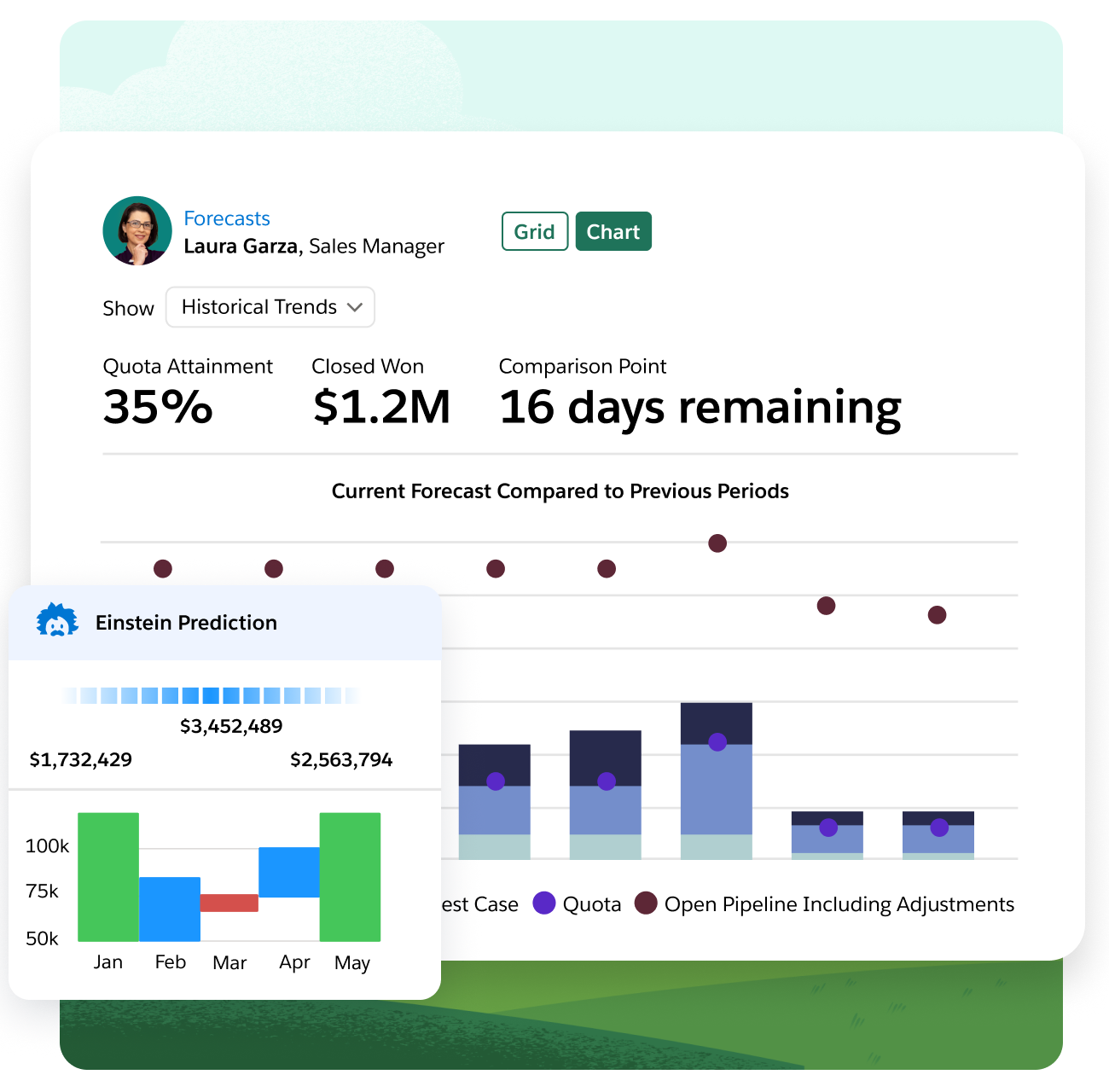
Finding the leaking stage in Salesforce. The data is the Opportunity record and its stage history, which an admin has to switch on by enabling historical trending. Managers then open Pipeline Inspection, which groups open deals by forecast category and shows pipeline changes (new, increased, decreased, moved in and moved out) for a chosen period, team or rep. Changes to amount, close date, forecast category and stage over the last seven days are highlighted. On each deal it adds days in stage, how often the close date was pushed and a flag when the next step is stale. That signal list comes from a SalesforceBen walkthrough, because Salesforce's own help pages didn't load for us.
Win rate and stage conversion by segment come from a custom report an admin or analyst builds, or from the prebuilt win rate, deal size and days-to-close dashboards that Salesforce lists under Revenue Intelligence, a paid add-on from $220 per user per month.
The edition decides what you get. Starter Suite ($25) lists email analytics only, Pro Suite ($100) lists quoting and forecasting, and Core is where Pipeline Inspection and Tableau Next appear. Tableau Next adds natural-language questions with visualizations through Tableau Agent; bought on its own it starts at $40 per user per month.
- your pipeline already lives in Salesforce and an admin can set up historical trending and reports
- you want managers to review the weekly pipeline change view without exporting data
- you have no Salesforce admin: reviewers rate ease of setup below features
- you're on Starter Suite or Pro Suite and need pipeline change views: Pipeline Inspection starts at Core ($195 per user per month)
- Users like
- Pipeline and opportunity management score highly
- Users dislike
- Support and ease of use score lower
- Source: G2, 27,576 reviews
How it works in practice
Salesforce lists Pro Suite, Core, Advanced and Max as billed annually, at $100, $195, $395 and $550 per user per month. Reviewers score Salesforce's pipeline and opportunity management highly and its ease of setup lower, which matches the admin work above.
- Starting price
- Starter Suite $25; Pro Suite $100; Core $195; Advanced $395; Max $550 per user per month (Pro and up billed annually). Tableau Next is included in Core, Advanced and Max; Revenue Intelligence is a separate add-on from $220
- Pipeline Inspection
- Core edition and up
- Tableau Next
- Included in Core, Advanced and Max
- Revenue Intelligence
- Add-on from $220 per user per month
- Setup
- Admin enables historical trending and assigns the permission set
HubSpot Sales Hub
Best for funnel reports without a BI tool
HubSpot Sales Hub costs $90 per seat per month on Professional ($100 billed monthly) plus a $1,500 one-time onboarding fee, and that's the first plan with the custom report builder.
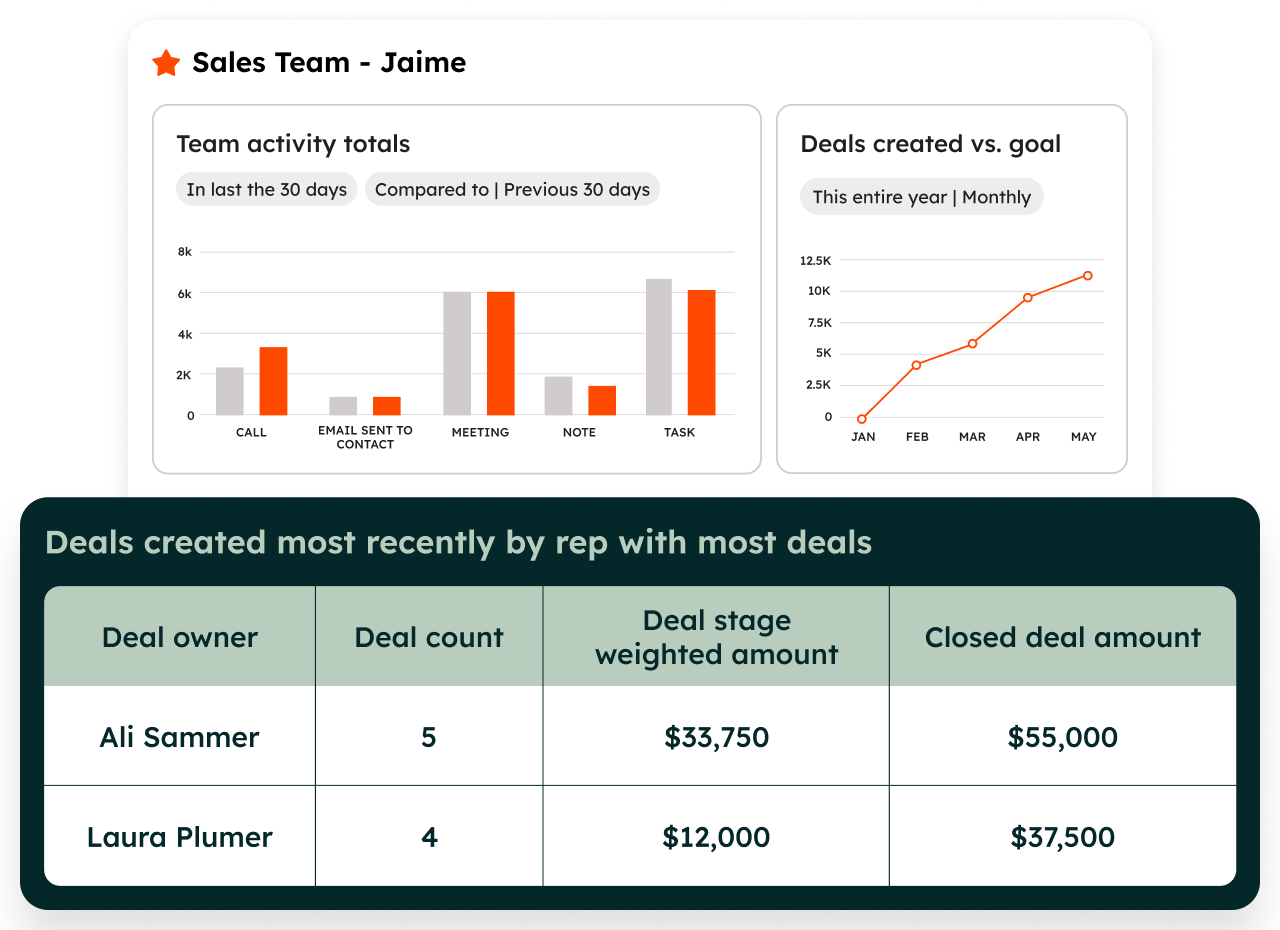
Explaining a win rate drop in HubSpot. The data is the deal records in the CRM, so there's no connector to set up. On Professional or Enterprise, RevOps builds a funnel report, which measures conversion between the stages of a deal pipeline, or a custom report in the report builder, which joins deals with related objects and calculated properties. Custom reports refresh about every two hours. Single-object reports on deals query the live CRM database, so they update faster. Leaders see the results on dashboards; the pricing table lists dashboard allowances that grow with the plan, from 10 to 100 dashboards with up to 50 reports each.
Two limits matter. The number of custom reports depends on the subscription and doesn't stack across hubs, and more capacity is a paid reporting limit increase. Attribution reports belong to Marketing Hub or Content Hub Enterprise, not Sales Hub.
- your deals, contacts and marketing data already sit in HubSpot
- you want RevOps to build funnel and custom reports without a BI tool
- you need revenue attribution inside Sales Hub: those reports are Marketing Hub Enterprise only
- you need data from outside HubSpot in the same report: custom reports run on HubSpot objects
- Users like
- Pipeline management and ease of use
- Users dislike
- Cost grows with seats and add-ons
- Source: G2, 14,366 reviews
How it works in practice
The free plan covers up to two users and Starter starts at $7 per seat, but the custom report builder isn't part of Starter. HubSpot's pricing page doesn't say which Starter price belongs to which billing option, so check the quote. Moving from Starter to Professional is the step that adds both the report builder and the onboarding fee.
- Starting price
- Free (up to 2 users); Starter from $7 per seat; Professional $90 per seat billed annually ($100 monthly) plus $1,500 onboarding; Enterprise $150 per seat plus $3,500 onboarding
- Custom report builder
- Professional and Enterprise
- Report refresh
- About every two hours
- Onboarding fee
- $1,500 Professional, $3,500 Enterprise
Pipedrive
Best for small teams
Pipedrive's Insights module builds reports on deals, leads and activities from EUR 14 per seat per month on the Lite plan, billed annually, with a report quota per user that grows with every plan.
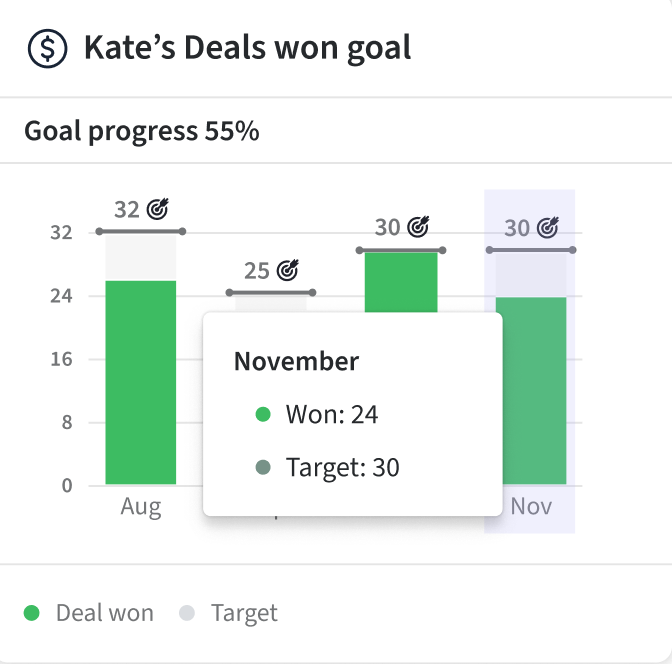
Finding the leaking stage in Pipedrive. The data is Pipedrive's own deals, leads and activities. In Insights, the Deal conversion report shows how deals move through the pipeline and the Deal duration report shows the time spent per stage, so a manager can find the bottleneck by filtering and grouping in the visual builder. You can also describe the report to the AI generator in plain language. Dashboards combine reports and goals, and can be shared with colleagues or through a public view-only link. Data visibility follows visibility groups, so a rep sees their own numbers while admins see company-wide statistics.
The quota is the practical limit: 15 reports per user on Lite, 50 on Growth, 250 on Premium and 500 on Ultimate. Custom fields in the visual builder, extra dashboards and the deal revenue forecast report need Premium or higher, and the product revenue forecast starts at Growth.
- a small team wants deal conversion and deal duration reports without a BI tool
- you want to describe a report in plain language and let the AI generator draft it
- you need grouping by custom fields in the visual builder below Premium
- you need deep cross-object analysis: reviewers rate built-in reporting as shallow
- Users like
- Ease of use and a visual pipeline
- Users dislike
- Limited advanced reporting capabilities
- Source: G2, 5,095 reviews
How it works in practice
Pipedrive's pricing page showed us euros only, so we list EUR prices: 14, 39, 59 and 79 per seat per month billed annually. Pipedrive renamed its plans in 2025, so older articles use Essential, Advanced, Professional and Enterprise. A Capterra summary lists limited advanced reporting as a recurring complaint, which fits a module built for deal tracking more than for analysis.
- Starting price
- Lite EUR 14, Growth EUR 39, Premium EUR 59, Ultimate EUR 79 per seat per month billed annually (the pricing page showed us EUR only)
- Reports per user
- Lite 15, Growth 50, Premium 250, Ultimate 500
- Extra dashboards
- Premium and up
- Deal revenue forecast report
- Premium and up
- Trial
- 14 days, no credit card
Layer 2: BI Tools on CRM Data
A BI tool earns its place when the question crosses systems: pipeline against finance data, marketing sources or support tickets. It also means someone owns the data model, and none of these three ships sales metrics ready-made. For a short answer to which business analytics tool to start with, pick Power BI if you run on Microsoft, Tableau if your data sits in Salesforce and Looker Studio if you want to start free.
Microsoft Power BI
Best for blending CRM and finance data
Power BI costs $14 per user per month on Pro and $24 on Premium Per User, both paid yearly, and the free account can build reports but can't share them.
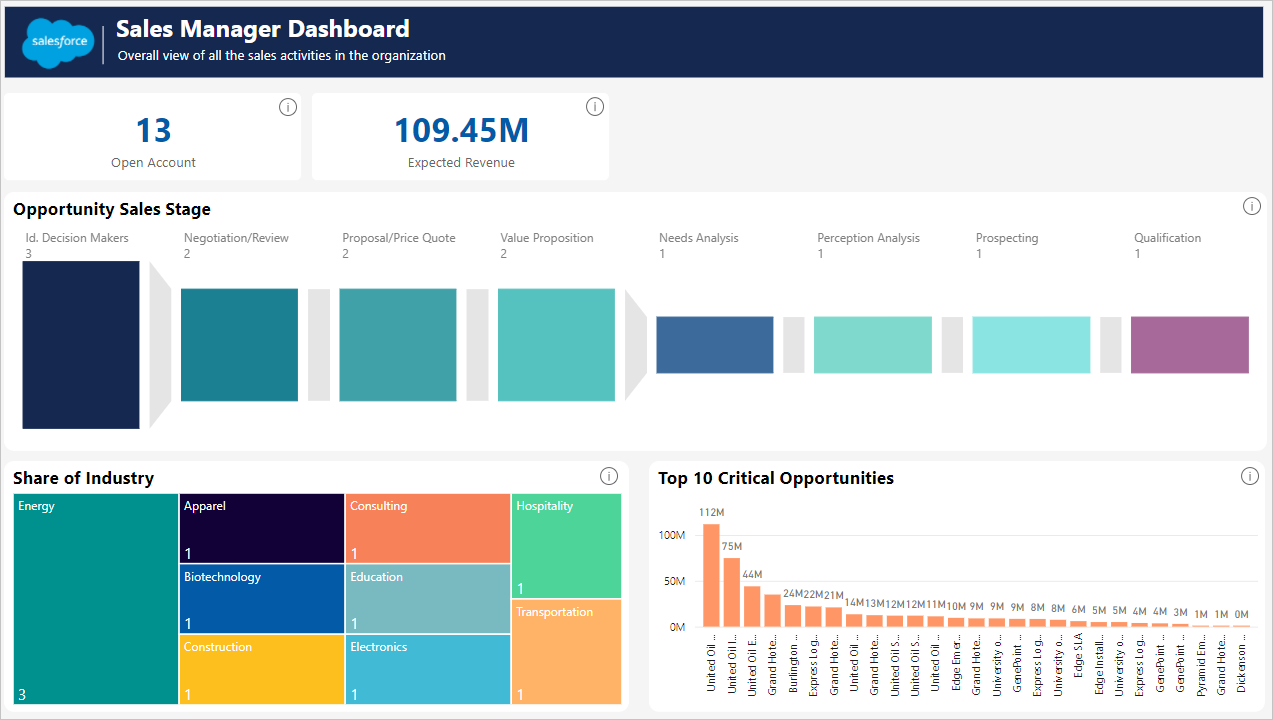
Finding the leaking stage in Power BI. An analyst connects Power BI Desktop to Salesforce, models the Opportunity and stage history tables and writes DAX measures for stage conversion, win rate and cycle length. Nothing sales-specific is prebuilt beyond a Salesforce service app that covers a single scenario and refreshes once a day. For anything large, use the Salesforce Objects connector, because Salesforce caps the Reports connector at 2,000 rows. The report is published to the Power BI service, where each viewer needs a Pro license unless the content sits on Premium or Fabric capacity.
Freshness is the second limit. Scheduled refresh runs up to 8 times a day on Pro and up to 48 times on Premium Per User or capacity, and a refresh on shared capacity must finish within two hours.
- you already run Microsoft 365 and have an analyst who can model Opportunity data
- you want one dashboard layer over CRM, finance and marketing data
- you have no analyst: win rate, conversion and cycle length are measures you write
- you want Copilot on a Pro-only budget: it needs Fabric F2+ or Premium P1+ capacity
- Users like
- Familiar for Excel users, broad data connectivity
- Users dislike
- Steep DAX learning curve, slow on very large datasets
- Source: G2, 1,646 reviews
How it works in practice
Reviewers like that Power BI is familiar to Excel users and connects to almost any source. They also say DAX is far from simple to learn, and they dislike buying Pro just to share a report. We found no Microsoft page for a HubSpot connector, so ask how that data would reach Power BI.
- Starting price
- Free account (build, can't share); Pro $14.00 per user per month; Premium Per User $24.00 per user per month, both paid yearly; Copilot needs paid Fabric capacity (F2+) or Premium (P1+)
- Pro refreshes
- 8 scheduled per day
- Premium refreshes
- 48 scheduled per day
- Salesforce Reports connector
- Capped at 2,000 rows
- Copilot
- Needs Fabric F2 or higher, or Premium P1 or higher
Tableau
Best for drill-down on Salesforce data
Tableau, which Salesforce owns, sells role-based licenses on the Standard edition at $75 for a Creator, $42 for an Explorer and $15 for a Viewer per user per month, billed annually.
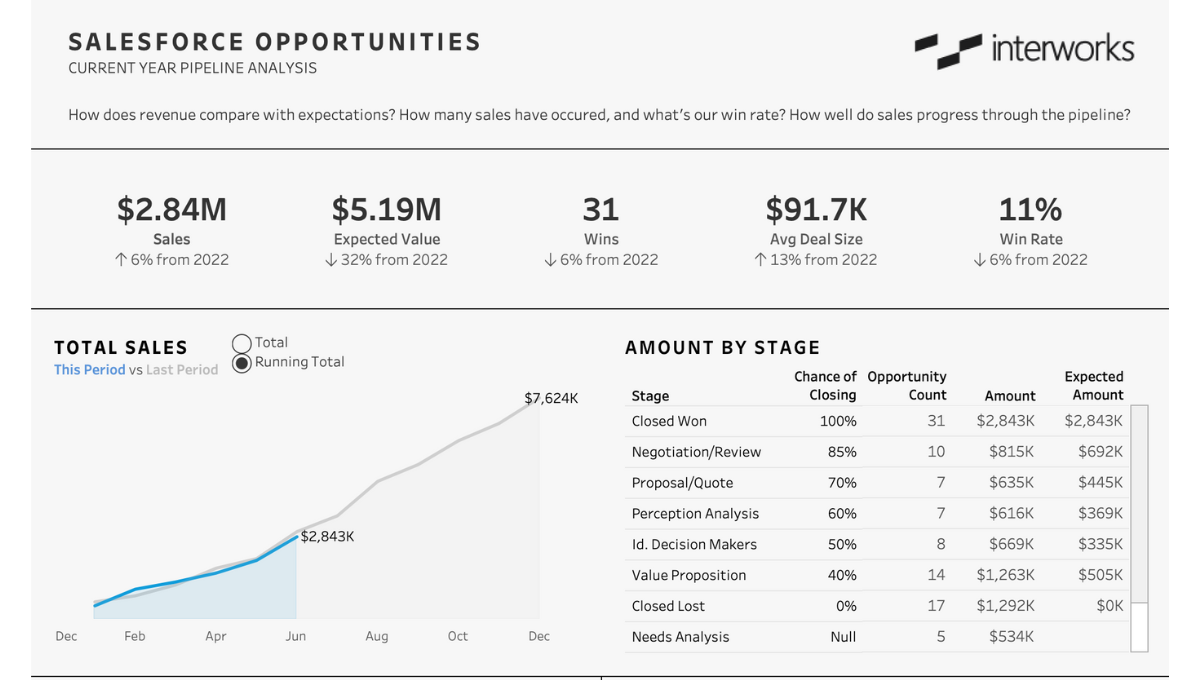
Explaining a win rate drop in Tableau. A Creator connects Tableau to Salesforce through the CRM connector, which is extract-only, or installs a Salesforce Pipeline accelerator from Tableau Exchange. The accelerator shows pipeline against the prior year, expected value by stage, win rate and average deal size by account and owner. Anything beyond that, such as stage-to-stage conversion or coverage, the Creator builds. Explorers can edit workbooks on published data sources and Viewers read them. A Viewer can subscribe themselves to a dashboard, but only Creators and Explorers can create subscriptions for other people or set data-driven alerts.
Every deployment needs at least one Creator license. Incremental refresh from Salesforce covers only the previous 30 days of changes, so a full extract refresh is the safety net for older records.
- you have a BI owner and want drill-down dashboards on Salesforce pipeline data
- you want many viewers at $15 or $35 each and a few builders
- you have fewer than about 10 seats and no BI admin: every deployment needs a Creator at $75 or more
- you need live Salesforce data in Tableau: the CRM connector is extract-only
- Users like
- Visualizations and drill-down
- Users dislike
- Cost and a steep learning curve for building dashboards
- Source: G2, 3,544 reviews
How it works in practice
Tableau Next, the newer product, starts at $40 per user per month billed annually and includes Tableau Agent and Tableau Semantics. Tableau Cloud+ adds Tableau Agent in authoring and dashboards, and its price is by quote. Reviewers praise the visualizations and drill-down, and name cost and a steep learning curve for builders as the downsides.
- Starting price
- Standard: Creator $75, Explorer $42, Viewer $15 per user per month billed annually. Enterprise: $115, $70, $35. Every deployment needs at least one Creator. Tableau Next from $40 per user per month billed annually
- Salesforce connector
- Extract only
- Role model
- Creator builds, Explorer edits published data, Viewer reads
- Accelerator
- Salesforce Pipeline on Tableau Exchange
- Enterprise edition
- Creator $115, Explorer $70, Viewer $35
Looker Studio
Best free dashboard layer
Looker Studio is free for creators and viewers, and the Pro tier costs $9 per user per project per month; Google's product page now calls the product Data Studio.
Finding the leaking stage in Looker Studio. First someone has to get CRM data into a source it can read. There's no native Salesforce, HubSpot or Pipedrive connector, so the options are a partner connector, a Google Sheet or a warehouse such as BigQuery. The product lists more than 1,400 data sources, and more than 1,300 of them are community connectors. A marketer or analyst then builds the report by drag and drop and writes calculated fields for conversion and win rate, because no sales metrics are prebuilt.
Freshness depends on the source. Google Sheets refresh every 15 minutes by default, and BigQuery and SQL sources every 1 to 50 minutes or every 1 to 12 hours. Viewers can refresh data themselves only if the editor allows it.
- you want a free shared dashboard and can export CRM data to Sheets or BigQuery
- a marketer or analyst on your team already builds in Google tools
- you want CRM metrics out of the box: connectors are third-party and nothing sales-specific is prebuilt
- you need vendor support on the free tier: reviewers rate support lowest
- Users like
- Flexibility and Google product integration
- Users dislike
- Quality of support scores lowest
- Source: G2, 460 reviews
How it works in practice
Pro content is owned by a Google Cloud project, which allows project-level permissions and team workspaces. Reviewers praise how easy it is to build and share, and G2's lowest sub-score for Looker Studio is quality of support, which matters on the free tier.
- Starting price
- Free for creators and viewers; Pro $9 per user per project per month (Google's product page now calls the product Data Studio)
- Sheets refresh
- 15 minutes by default
- CRM connectors
- Partner or community, no native HubSpot or Salesforce
- Pro
- $9 per user per project per month
- Pro adds
- Support and team workspaces
Layer 3: Revenue Intelligence
These platforms add what the CRM can't see: what buyers said on calls and how a deal moved between two dates. Both are quote-only, so you'll learn the price in a sales call rather than on a pricing page, and both assume a RevOps owner.
Gong
Best for win rate beside call data
Gong is quote-only: a per-user license plus a platform fee based on the number of users supported.
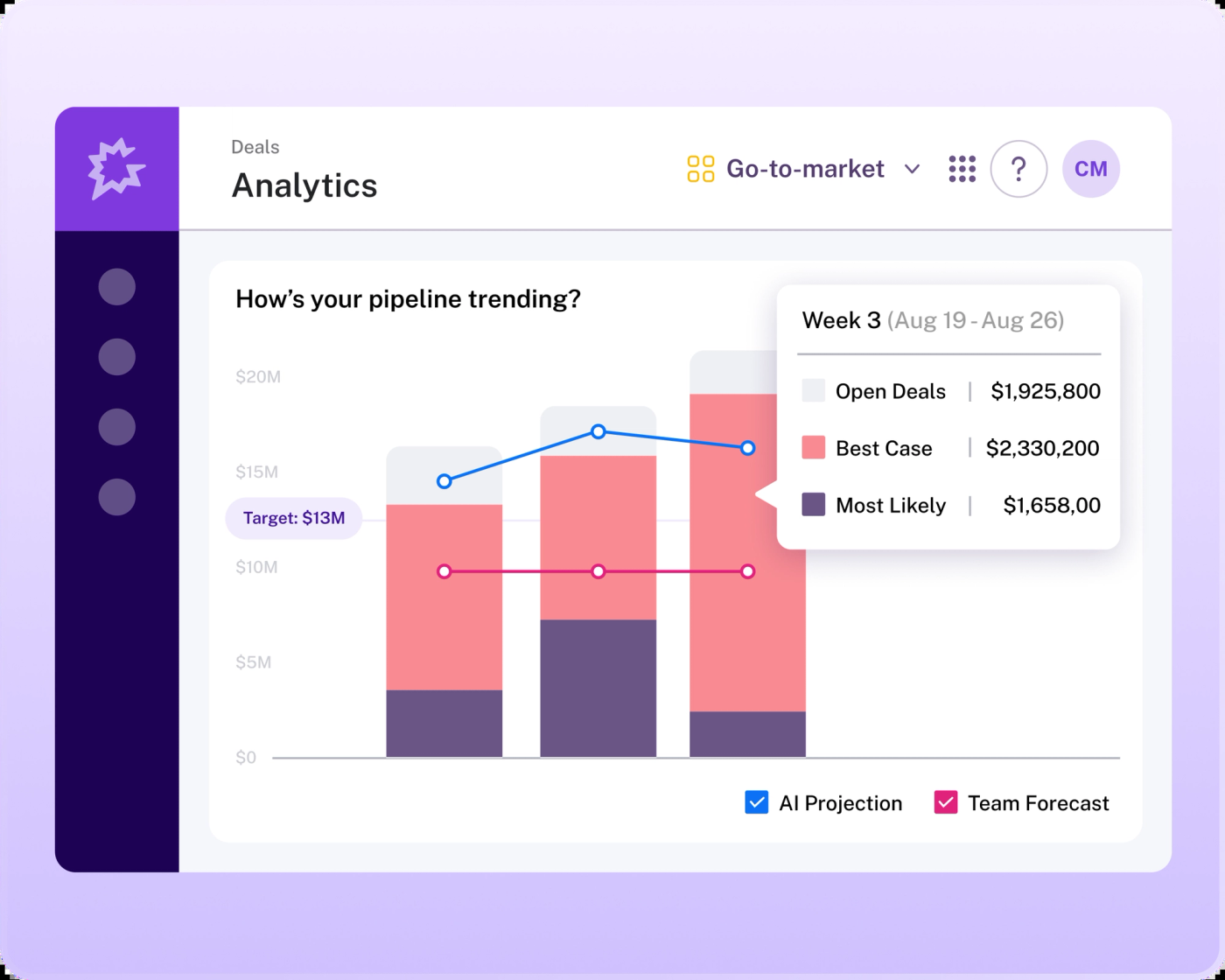
Explaining last quarter's win rate drop in Gong. The data comes from the CRM integration plus Gong's captured conversations. A Business admin with the Manage dashboards permission defines metrics and targets in the Data studio and builds a dashboard from a template. The rep scorecard recipe has six KPI widgets (booking attainment, coverage, gap to target, pipeline created, win rate and average sale price) and five charts, including win rate over time and lost deals by reason. Managers drill from a KPI into a list view of the accounts and opportunities behind it, filtered by team.
The plan fit needs a question in the demo. Gong's help center lists dashboards as available on any plan, but the Forecast templates need a Forecast seat, Engage templates need an Engage seat and the scorecard template needs the Enable plan. The Forecast rollup and target attainment widgets accept fiscal dates only.
- you want pipeline metrics and what buyers said on calls in one place
- a RevOps admin can define metrics in the Data studio and keep them current
- you need conversion reports from CRM data alone: Gong needs a CRM integration and an admin to model metrics
- the rep scorecard recipe needs a Forecast seat, so check your tier before the demo
- Users like
- Ease of use and integrations (whole platform)
- Users dislike
- Hard-to-navigate reporting (Capterra reviewers)
- Source: G2, 6,521 reviews
How it works in practice
Gong's help center describes dashboards, but we didn't find a documented natural-language query or scheduled report delivery for them, so ask for both in the demo. Reviewers rate Gong highly for ease of use and support.
- Starting price
- Quote only (per-user license plus a platform fee based on users supported)
- Win rate metrics
- By dollars and by deal count
- Dashboard builder permission
- Manage dashboards
- Forecast templates
- Need a Forecast seat
- Builder permission
- Manage dashboards plus a CRM integration
Clari
Best for pipeline movement
Clari doesn't publish prices, and since the merger with Salesloft its pages lead to sales; the forecast product kept the Clari name.
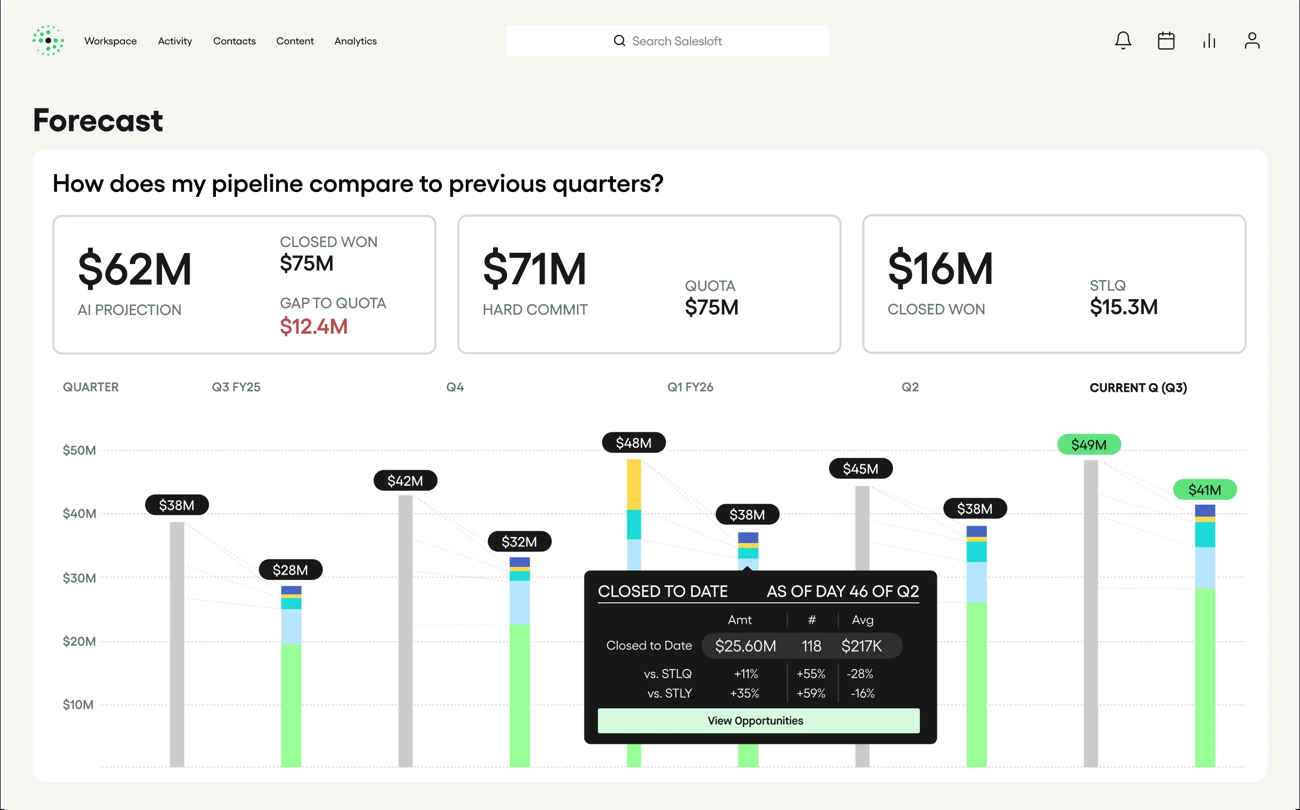
Finding the leaking stage in Clari. The data is CRM opportunities synced from Salesforce or HubSpot. A RevOps admin configures the forecast fields (quota, commit, commit coverage, best case and pipeline), and managers use the waterfall view to see how pipeline changed between two dates, split into amount decrease, lost and slipped. A Salesloft community post describes groupings by executive buyer engaged, competitors and account health. That post dates from 2023, so check the current interface in a demo.
We found no dedicated pipeline coverage report beyond the commit coverage field, and no description of who builds custom analytics reports. Both are fair questions for the vendor.
- leadership reviews pipeline movement weekly and wants to see what slipped or shrank
- you have a RevOps owner to configure forecast fields and groupings
- you need a published price: Salesloft shows none
- you want self-serve ad hoc reports: reviewers flag customization limits
- Users like
- Salesforce integration and forecasting ease
- Users dislike
- Customization limits
- Source: G2, 5,609 reviews
How it works in practice
Reviewers on G2 cite the Salesforce integration and ease of forecasting, and name customization limits as the weakness. If forecasting is your main use, our guide to sales forecasting software compares Clari with Aviso, Gong and the CRM-native options.
- Starting price
- Quote only
- Waterfall categories
- Amount decrease, lost, slipped
- Forecast fields
- Quota, commit, commit coverage, best case, pipeline
- Brand
- Salesloft is the company brand since September 2, 2026
Layer 4: Sales Performance and Commission Analytics
Commission analytics answers a different question from the other three layers: what the pipeline cost you in pay, not why deals stall. It matters once comp plans change often enough that a spreadsheet stops being reliable.
CaptivateIQ
Best for commission analytics
CaptivateIQ is quote-only: seats are admin users plus payees, with a one-time setup fee, and reporting is included in the subscription while ASC 606 reporting is a paid add-on.
Costing a quarter's commission by plan in CaptivateIQ. Closed deals come in from Salesforce, HubSpot or Microsoft Dynamics, other data such as HR and ERP records can sync in, and the plan rules calculate each payout. An admin builds custom dashboards across compensation data by team, region and commission plan. Filters segment the dashboards without separate reports, and clicking a data point shows the table of raw rows behind it.
It doesn't describe win rate, stage conversion or call analytics. Treat it as the answer to attainment, payout and cost of commission, and keep your funnel questions in Layers 1 to 3.
- finance or sales ops needs commission cost by plan, team and region
- you want to click from a dashboard number to the rows behind it
- you need win rate, stage conversion or call analytics: its reporting covers compensation
- you want a published price: seats and a setup fee are quoted
- Users like
- Intuitive navigation and accurate commission information
- Users dislike
- Steep learning curve
- Source: G2, 3,488 reviews
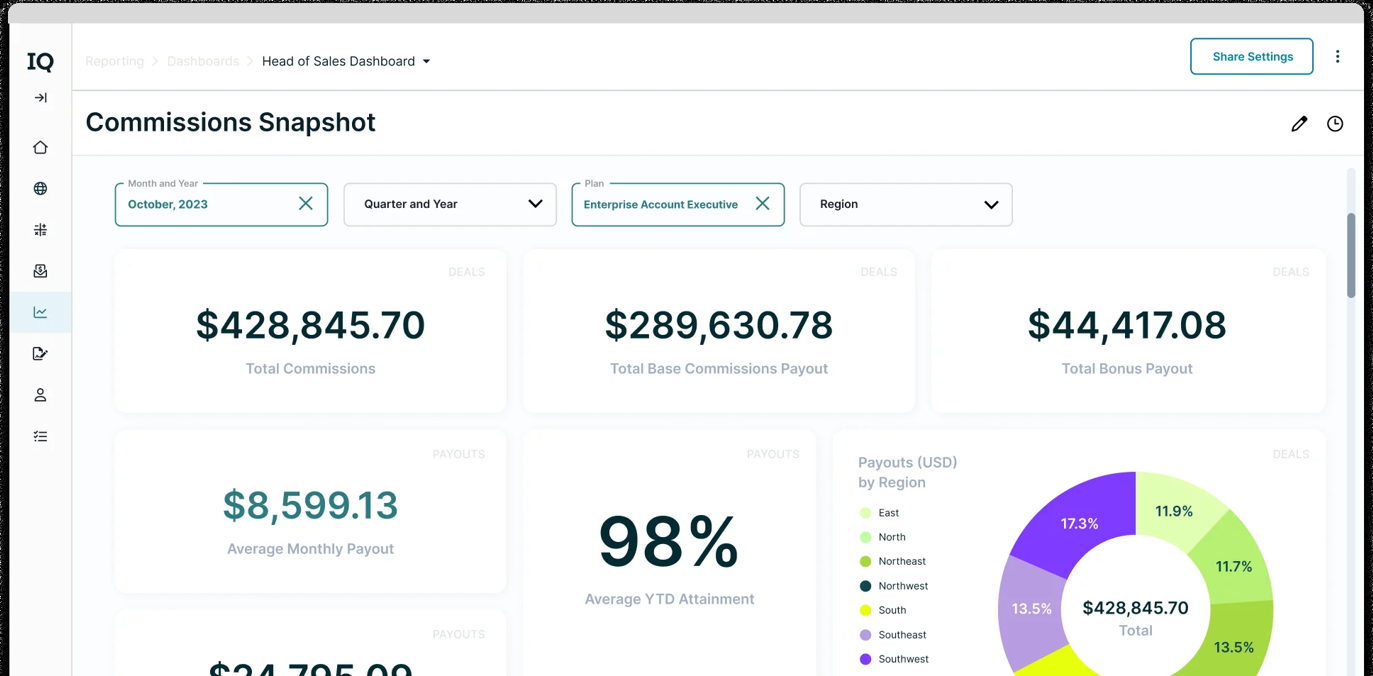
How it works in practice
Reviewers praise intuitive navigation and accurate commission information. A Capterra reviewer notes a fairly steep learning curve and mid-year plan changes that aren't always reflected right away.
- Starting price
- Quote only (seats = admin users plus payees, one-time setup fee; ASC-606 reporting is a paid add-on)
- CRMs
- Salesforce, HubSpot, Microsoft Dynamics
- Reporting
- Included in the subscription
- ASC 606 reporting
- Paid add-on
Which Question Needs Which Sales Analytics Tool
Start from the question you can't answer today. This table maps the most common ones to the layer that handles it and the tools in this guide that cover it.
| Question you can't answer | Layer | Tools to shortlist | What decides it |
|---|---|---|---|
| Which stage leaks pipeline? | CRM reports, revenue intelligence | Pipedrive (Deal conversion), HubSpot (funnel report), Salesforce (Pipeline Inspection), Clari (waterfall) | Whether stage history exists and is filled in |
| Why did win rate drop last quarter? | Revenue intelligence, BI | Gong (win rate by dollars and by count, lost deals by reason), Tableau (pipeline accelerator), HubSpot (custom report) | Whether you need the calls behind the number |
| Do we have enough pipeline to hit the number? | Revenue intelligence, BI | Clari (commit coverage), Gong (coverage widget), a Power BI measure | Who owns the quota data |
| How does the pipeline line up with finance data? | BI | Power BI, Tableau, Looker Studio | Which warehouse or sheet the data sits in |
| What did commission cost by plan and region? | Performance analytics | CaptivateIQ | Whether plans change mid-year |
| Which reps need coaching? | Revenue intelligence | See our guide to sales coaching software | Whether you record calls |
What Sales Analytics Software Costs
Sales analytics software costs anywhere from nothing to $195 per user per month for the CRM edition that includes pipeline change views, and the revenue intelligence platforms and commission tools are quote-only. Don't treat the number on the pricing page as the number you'll pay: the plan that includes the report builder, the viewers who each need a seat and the onboarding fee all sit on top.
| Tool | Plan that unlocks the reporting | Published price | What else you pay for |
|---|---|---|---|
| Salesforce Sales Cloud | Core: Pipeline Inspection and Tableau Next | $195 per user per month, billed annually | Revenue Intelligence add-on from $220 per user per month |
| HubSpot Sales Hub | Professional: custom report builder | $90 per seat per month billed annually, $100 monthly | $1,500 one-time onboarding |
| Pipedrive | Premium: custom fields in the visual builder, extra dashboards | EUR 59 per seat per month, billed annually | Report quota per user rises from 15 to 500 across plans |
| Power BI | Pro: sharing reports | $14 per user per month, paid yearly | Fabric F2 or higher, or Premium P1 or higher, for Copilot |
| Tableau | Creator builds, Viewer reads | $75 per Creator and $15 per Viewer per month, billed annually | At least one Creator per deployment; Enterprise edition seats cost more |
| Looker Studio | Free tier | $0 for creators and viewers; Pro $9 per user per project | Partner connectors for CRM data |
| Gong | Forecast seat for the rep scorecard recipe | Quote only | Platform fee on top of per-user licenses |
| Clari | Quote only | Quote only | Not published |
| CaptivateIQ | Quote only | Quote only | Setup fee; ASC 606 reporting add-on |
Monthly cost on annual billing where the vendor bills annually. Looker Studio Pro is billed monthly and tied to one Google Cloud project. Tableau Standard assumes one Creator who builds and everyone else reading. Partner connectors for CRM data are not included.
Free Ways to Start
Three options let you test the questions before you pay. HubSpot's free plan covers up to two users, though the custom report builder isn't included. Looker Studio is free for creators and viewers, and Power BI's free account lets you build reports, though you can't share them without Pro. Pipedrive offers a 14-day trial with no credit card, which is enough to run the deal conversion report on your own pipeline.
How to Choose Sales Analytics Software
Choosing sales analytics software starts with the layer, then the owner. If the reports in your CRM answer your questions, you don't need another tool, you need to fill the stage fields. If you need to join CRM data with finance or marketing data, you need a BI tool and an analyst who owns it. If you need to know what buyers said before a deal slipped, you need revenue intelligence and a RevOps owner.
| Layer | Who builds the first report | What they have to maintain | Skip it if |
|---|---|---|---|
| CRM reports | Admin or sales ops | Stage history, required fields, report quota | You need data from outside the CRM |
| BI tool | Analyst | Data model, connectors, refresh schedule | Nobody on the team writes measures |
| Revenue intelligence | RevOps | Metric definitions, dashboards, call recording rules | You can't budget for a quote and a platform fee |
| Performance analytics | Sales comp or finance | Plan rules, payee list | Your plans rarely change |
If you're not sure which layer you need, count the people who would build and maintain the reports. That number usually decides it. Run a short pilot before you sign anything, and use this checklist to keep it honest.
- Pick one question your team argues about every week, such as stage conversion
- Write the metric formula down, including whether win rate counts deals or dollars
- Export 12 months of closed deals and check that the fields the formula needs are filled in
- Ask the vendor which plan includes the report and who is allowed to edit it
- Build the report on your own data, not the demo data
- Compare the refresh schedule with how often the meeting happens
- Check the tool's number against a spreadsheet you calculate by hand for one quarter
If a metric moves because reps weren't ready for a pricing or product change, no dashboard shows that. That gap is what The GTM Lead is built for.
Can AI Answer Sales Analytics Questions
Yes, AI can answer sales analytics questions in a few of these tools, though each one has a plan or capacity gate, and none of them replaces a clean CRM. Salesforce's Tableau Next, with Tableau Agent, adds natural-language questions with visualizations on the Core, Advanced and Max editions. Pipedrive's Insights help article describes generating a report from a prompt. Power BI's Copilot needs paid Fabric capacity at F2 or higher, or Premium at P1 or higher, and only works well on a prepared semantic model. Tableau Agent in authoring and dashboards sits in the Cloud+ edition. Looker Studio offers natural-language questions through BigQuery conversational agents that a technical user has to build first. The Gong help pages we read don't describe a natural-language query for dashboards.
AI changes how you ask the question, not who defines the metric. The win rate formula still has to exist before an assistant can answer with it.
What is sales analytics software?
Sales analytics software collects sales data from your CRM, calls and quota plans and turns it into dashboards and reports on pipeline, conversion, win rate, sales cycle length and forecast accuracy. It ranges from the reports inside a CRM to BI tools and revenue intelligence platforms.
Do I need sales analytics software if I already have a CRM?
A CRM's own reports are enough when your stage fields are filled in and your questions stay inside one CRM. Add a BI tool when you need to join CRM data with finance or marketing data, and revenue intelligence when you need the calls behind a deal.
Which sales metrics should I track first?
Start with win rate, stage conversion, sales cycle length and pipeline coverage. They need only a handful of CRM fields, and they show whether the problem is pipeline volume, a leaking stage or a slow close.
How much does sales analytics software cost?
Sales analytics software costs from free (HubSpot's free plan, Looker Studio) through $14 per user per month for Power BI Pro to $195 per user per month for the Salesforce edition with Pipeline Inspection. Gong, Clari and CaptivateIQ are quote-only. Viewer seats, onboarding fees and connectors add to the total.
What is the best sales analytics software for a small team?
A small team usually gets the most from the CRM it already has. Pipedrive's Insights reports start at EUR 14 per seat and HubSpot's custom report builder starts at Professional. A BI tool only makes sense once someone can own the data model.
Can AI answer sales analytics questions?
AI can answer them in some tools. Salesforce Tableau Next, Power BI Copilot, Tableau Agent and Pipedrive's report generator accept natural-language requests, each with a plan or capacity requirement. They still depend on your metric definitions and clean CRM data.